
 admin
April 30, 2026
admin
April 30, 2026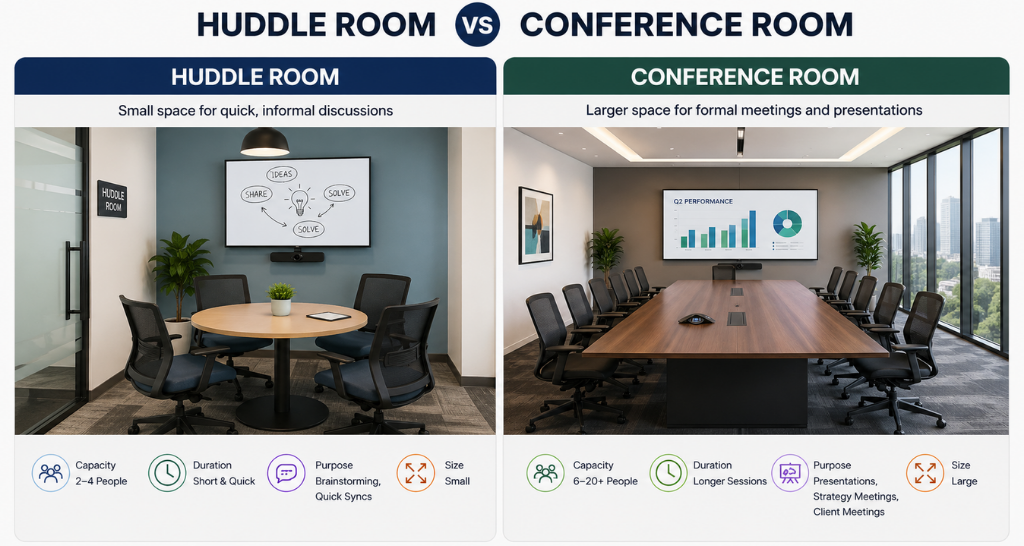
Huddle Room vs Conference Room: Choosing the Right AV System for Your Space.
Walk into any modern office and you will likely find two things: a boardroom that gets booked for ten minute catch ups, and a four-person huddle space with a screen that barely works. Both are meeting rooms. Both are failing their users just in different ways.
The truth is, a well functioning huddle room AV system looks nothing like a conference room setup. The technology, the scale, and the user experience all need to be designed around the room not copied from one space to another. Get it right, and every meeting starts on time, sounds clear, and feels effortless. Get it wrong, and even a ₹10 lakh setup will frustrate your team every single day.
This blog breaks down the key differences between huddle room and conference room technology requirements and more importantly, how room size should drive every decision you make when designing your AV system.
First, Why Room Size Actually Matters in AV Design
Most people think about AV as a product decision: which screen, which camera, which speaker. In reality, it is an architectural decision first.
Room size directly affects audio coverage, camera field of view, display visibility, and platform integration needs. A ceiling speaker designed for a 400 sq ft boardroom will over-power a 100 sq ft huddle room. A USB videobar perfect for four people will make participants in a 20-person room look like distant thumbnails on a call.
Meeting room AV design by room size is not a luxury consideration, it is the baseline for making collaboration actually work.
Huddle Rooms (Up to ~150 sq ft): Small Space, Smart Setup
A huddle room is typically designed for 2 to 6 people. Think of it as a quick-collaboration zone not a formal presentation space. The meetings are shorter, less structured, and heavily hybrid. Someone is almost always dialling in.
What a huddle room AV system needs:
• Video: A videobar is the ideal choice. It is a single, compact device that combines a wide-angle camera, microphone, and speaker designed precisely for small, intimate spaces. No cables across the table. No separate devices to manage. Just one unit that does the job cleanly.
• Audio: The built-in audio from a quality videobar is usually sufficient for a room under 120 sq ft. For slightly larger huddle spaces, a tabletop speaker adds coverage without overcomplicating the setup.
• Display: A single 55 to 65-inch display works well. Position it at eye level, directly across from the seating area, so remote participants feel present not like a face on a ceiling.
• Connectivity: BYOD support matters here. Teams bring their own laptops, so clean HDMI and USB ports or a wireless presentation system make every meeting start faster. No one should spend the first five minutes hunting for the right cable.
• Platform: Zoom Rooms, Microsoft Teams Rooms, or Google Meet Hardware integration can be added to make the room one-touch-ready. Users walk in, tap the panel, and the call connects.
• Booking: Room booking panels outside the door prevent the classic double-booking chaos and also stop a 10-person meeting from spilling into your four-person huddle space.
The goal with a huddle room is simplicity above everything. If a non-technical person cannot walk in and start a meeting in under 30 seconds, the setup is too complex.
Conference Rooms (150-350 sq ft): Where Clarity Becomes Critical
A mid-size conference room is where most formal team meetings, client presentations, and cross department reviews happen. The audience is larger, the stakes are higher, and the AV system needs to perform every time. Conference Board Room AV solutions designed for large spaces PTZ cameras, ceiling mics, dual displays & smart controls for seamless hybrid meetings.
This is also where the biggest mistakes happen. Companies that install huddle room technology in a conference room end up with remote participants who cannot hear the back row, cameras that miss half the table, and displays that strain eyes from the far end.
Conference room AV setup requirements:
• Video: A USB PTZ (Pan-Tilt-Zoom) camera replaces the videobar here. PTZ cameras offer directional control, wider room coverage, and auto-framing features that track active speakers across a larger table. For hybrid meetings, this is the difference between remote participants seeing who is talking or staring at an empty chair.
• Audio: Tabletop microphone arrays or ceiling microphones ensure everyone in the room is picked up clearly, regardless of where they are seated. Ceiling speakers distribute audio evenly and eliminate the directional dead zones that wall-mounted units create.
• Display: Depending on the room depth, dual displays or a larger 75-inch+ screen ensures content is visible to participants sitting at varying distances. Screen placement is as important as screen size position matters and LED video display solutions for corporate spaces — vibrant visuals, seamless content sharing & crystal-clear resolution for boardrooms, lobbies & meeting rooms..
• Control: A touch control panel simplifies room management. Meeting start, volume, screen sharing, lighting all on one panel. Reduces the IT support calls significantly.
• Lighting: Occupancy-based lighting automation and scene control presentation mode, discussion mode, standby makes the room environment adaptive and energy efficient.
Board Rooms (350 sq ft and Above): Enterprise-Grade, Zero Compromise
A boardroom is not just a bigger conference room. It carries brand weight. Leadership meetings, board reviews, investor calls, and client presentations all happen here. The AV system must be invisible in operation and flawless in performance, Board room AV solutions designed for large, high-stakes spaces — PTZ cameras, beamforming mics, dual displays & one-touch control for flawless hybrid meetings.
At this scale, the huddle room vs conference room technology distinction becomes sharper. Patchwork AV solutions and consumer-grade equipment simply do not belong here.
• Video: Multiple PTZ cameras or a premium wide-angle 4K camera with auto-tracking. The room should capture every participant not just whoever sits closest to the lens.
• Audio: Ceiling microphone arrays with beamforming technology. These pick up voices directionally, filtering out ambient noise and HVAC hum. Combined with ceiling speaker arrays, the result is a room where everyone is heard without anyone needing to lean toward a device.
• Display: Dual large-format displays (86-inch and above), or a video wall, depending on room depth and seating arrangement. Content sharing and video conferencing feeds should be independent not competing for the same screen.
• Integration: Full platform certification for Zoom Rooms, Microsoft Teams Rooms, or Webex is non-negotiable. One-touch meeting join, automatic camera switching, and in-room scheduling sync are expected at this level.
• Lighting & Acoustics: Automated scene-based lighting and acoustic treatment are worth the investment in a boardroom. Video calls in poorly lit, echo-heavy rooms undermine the professionalism of everything else you have built.
Quick Reference: AV Design by Room Size
Here is a practical summary of the technology stack that maps to each room type:
• Huddle Room (up to 150 sq ft, 2-6 people): Videobar + built-in audio + 55 – 65″ display + BYOD/wireless sharing + room booking panel + optional Zoom/Teams/Meet integration
• Conference Room (150-350 sq ft, 6 – 12 people): USB PTZ camera + tabletop/ceiling mic + ceiling speaker + 75″+ display + touch control panel + lighting automation + platform integration
• Boardroom (350 sq ft+, 12 – 25+ people): Multi-camera PTZ or 4K auto-track + beamforming ceiling mic arrays + ceiling speaker arrays + dual large-format displays or video wall + full platform certification + scene based lighting + acoustic treatment
The Most Common Mistake and How to Avoid It
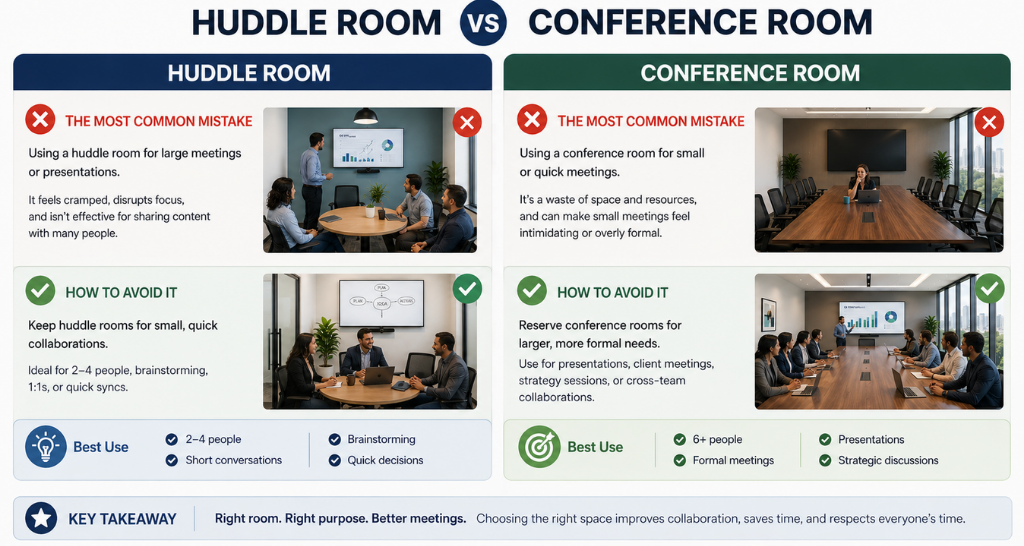
The single most frequent error in office AV design is treating all meeting rooms the same. Identical displays, identical cameras, identical audio deployed across 100 sq ft and 400 sq ft rooms alike. The result is overspending in small rooms and underperforming in large ones.
The right approach is a room-by room AV audit before any purchase is made. Map your rooms by size, typical headcount, meeting type, and hybrid usage frequency. That data tells you exactly which technology tier belongs where and prevents the expensive mistake of deploying the wrong system in the wrong space.
Space Drives the System, Not the Other Way Around
Choosing between a huddle room AV system and a conference room AV setup is not about preferenceit is about purpose and proportion. A room’s size, its intended use, and the number of people it serves should dictate every technology decision: the camera type, the audio approach, the display size, and the control experience.
When these decisions are made thoughtfully matched to the room rather than forced onto it meetings run smoother, technology gets used, and teams actually look forward to walking into the space, Vallect delivers board room AV solutions designed for large, high-stakes spaces PTZ cameras, beamforming mics, dual displays & one-touch control for hybrid meetings.
If you are designing a new workspace or upgrading an existing one, Vallect’s AV consultancy team helps you map the right system to every room from a compact huddle corner to a full-scale boardroom. No guesswork, no over-engineering.
Ready to design the right AV system for your space? Talk to Vallect.
📞 Call Us: +91-7303435333
📧 Email: info@vallect.com