
 admin
June 15, 2026
admin
June 15, 2026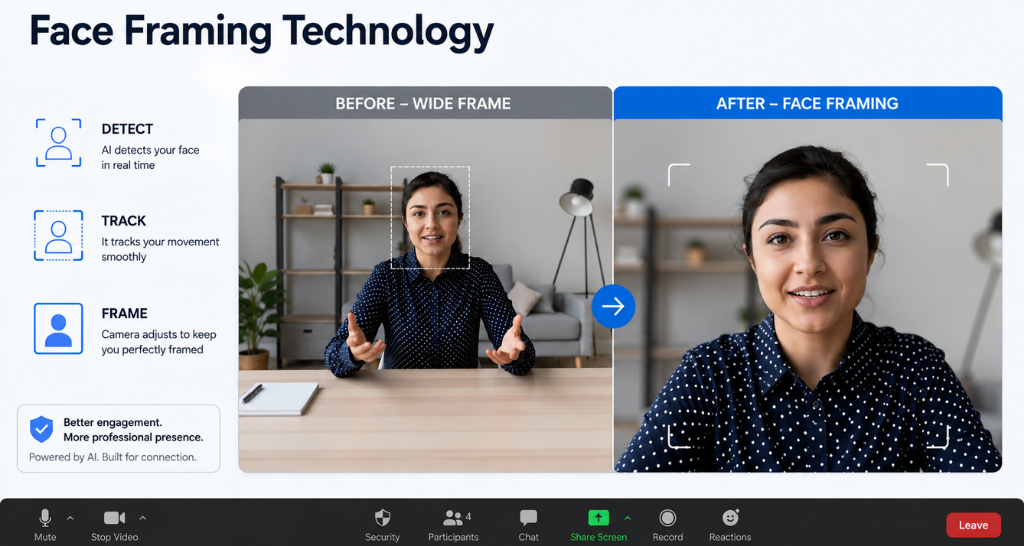
Face Framing Technology Explained: A Smart Feature in Video Conferencing Systems
Modern workplaces are becoming more connected with hybrid meetings, remote collaboration, and virtual communication. In these environments, clear video communication has become just as important as audio quality. One technology improving online meetings is Face framing technology in video conferencing..
Traditional conference cameras often require manual adjustment to capture participants properly. If someone enters or leaves the room, the camera may not show everyone clearly. This creates distractions and reduces engagement during meetings.
With Face framing in video conferencing, cameras can automatically identify participants, adjust the viewing angle, and keep everyone visible without manual control. This smart feature creates a more natural meeting experience by ensuring that every participant stays in focus.
Whether used in corporate offices, classrooms, boardrooms, or large meeting spaces, this technology helps organizations improve communication and collaboration.
What is Face Framing Technology?
Face framing in video conferencing is an intelligent camera feature that uses advanced algorithms to detect people in a meeting room and automatically adjust the camera view. It ensures that all participants remain visible and properly positioned within the frame.
Unlike traditional cameras that capture a fixed area, modern smart cameras analyze the room environment and adjust the video output according to the number and location of people.
The system can detect:
- Number of participants
- Face positions
- Movement within the room
- Seating arrangement
- Distance between participants
This allows the camera to create a balanced view where everyone appears clearly during the meeting.
Many advanced systems combine artificial intelligence with Facial recognition camera technology to improve detection accuracy and deliver a smoother meeting experience.
The goal of Face framing in video conferencing is not only to show faces but also to make virtual meetings feel closer to real-life conversations.
How Does Face Framing Technology Work?
Face framing in video conferencing works through a combination of cameras, artificial intelligence, and image processing technology.
The process usually happens in several steps:
1. Camera Captures the Room
The conferencing camera continuously captures the meeting environment. It identifies the seating area and monitors participant movement.
2. AI Detects Participants
The system uses AI-based detection to identify human faces and bodies within the camera view.
Modern Facial recognition camera technology helps the system understand where participants are positioned and how many people are present.
3. Calculates the Best Frame
After detecting participants, the camera calculates the ideal viewing angle.
It considers:
- Distance between people
- Room size
- Participant positions
- Available camera range
4. Adjusts Camera Position
The camera automatically changes:
- Zoom level
- Pan direction
- Tilt position
This creates a balanced view without requiring someone to operate the camera.
5. Maintains Focus During Meetings
If a person joins or leaves the meeting, the system updates the frame automatically.
This is why an Auto framing camera for conference rooms is becoming a preferred choice for modern meeting spaces.
Normal Camera vs Face Framing Technology :
| Feature | Normal Conference Camera | Face Framing Technology |
|---|---|---|
| Camera Adjustment | Manual adjustment required | Automatic adjustment |
| Participant Detection | Cannot detect people | Uses AI detection |
| Multiple Participants | May miss people | Keeps everyone visible |
| Meeting Experience | Less interactive | More engaging |
| Room Changes | Requires manual setup | Adjusts automatically |
| Movement Tracking | Limited | Tracks participant positions |
Why is Face Framing Important in Video Conferencing?
In professional meetings, visibility plays a major role in communication. When participants are not properly visible, it becomes difficult to understand expressions, reactions, and engagement levels.
Face framing in video conferencing solves this problem by automatically keeping participants inside the camera view.
1. Better Participant Visibility
In large conference rooms, people may sit at different distances from the camera. Without smart adjustment, some participants may appear too small or completely outside the frame.
2. Improved Meeting Engagement
Visual interaction improves attention and collaboration. When people can clearly see each other, discussions become more effective and
a video wall is a large display made of multiple screens joined together to show impactful visuals..
3. Reduces Manual Camera Adjustments
Earlier, meeting organizers had to manually move cameras before every session. With an Automatic camera framing feature, the system handles adjustments automatically.
4. Supports Hybrid Workplaces
Many companies now operate with both remote and office employees. A properly framed video ensures remote participants can see everyone in the room.
5. Creates a Professional Experience
A smart camera setup makes meetings look more organized and professional, especially during client discussions and important presentations.
Key Components and Technologies Behind Face Framing :
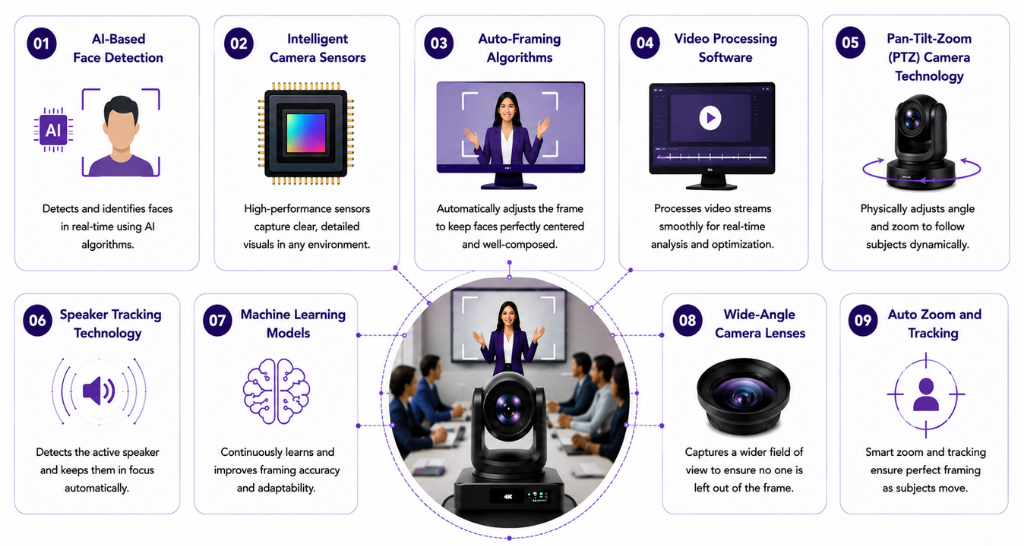
Face framing in video conferencing depends on multiple technologies working together to deliver accurate and real-time camera adjustments. It is not only a camera feature but a combination of hardware and intelligent software.
- Intelligent Camera Sensors
- AI-Based Face Detection
- Auto-Framing Algorithms
- Video Processing Software
- Pan-Tilt-Zoom (PTZ) Camera Technology
- Speaker Tracking Technology
- Machine Learning Models
- Wide Angle Camera Lenses
- Auto Zoom and Tracking
Benefits of Face Framing Technology :
The adoption of Face framing in video conferencing is increasing because businesses need better ways to connect remote and in-office teams.
1. More Natural Communication
When participants are clearly visible, conversations feel more personal. Teams can understand facial expressions and reactions better.
2. Better Collaboration
A properly framed meeting allows everyone to participate equally. Nobody feels left out because of poor camera positioning.
3. Saves Time
Employees do not need to spend time adjusting cameras before every meeting.
An Auto framing camera for conference rooms automatically prepares the view and reduces setup time.
4. Improves Professional Meetings
For client calls, presentations, and business discussions, a properly adjusted camera creates a better impression.
5. Supports Different Room Sizes
Whether it is a small huddle room or a large boardroom, smart framing solutions can adapt according to the environment.
6. Enhances Hybrid Meeting Experience
Remote employees depend on video quality to feel connected. Better framing improves participation and reduces communication gaps.
Facts and Figures :
The growth of smart meeting solutions shows how quickly workplaces are changing.
- Hybrid work models have increased the demand for intelligent conference room solutions.
- AI-powered cameras are reducing the need for manual meeting room control.
- Smart video technologies help improve meeting efficiency by reducing setup delays.
- Automated camera features support better communication between remote and office teams.
Modern businesses are investing in intelligent AV systems because video meetings are now a regular part of daily operations.
How Vallect Helps With Face Framing Solutions
A successful video conferencing setup requires the right combination of technology, installation, and support.
Vallect helps organizations create professional meeting environments by providing advanced AV solutions designed for modern workplaces.
With smart conferencing solutions, businesses can improve:
- Meeting room communication
- Video quality
- Collaboration experience
- Employee productivity
By integrating intelligent cameras, displays, and audio systems, Vallect helps companies build meeting spaces where technology works smoothly in the background.
A properly designed conferencing setup ensures that features like Face framing in video conferencing deliver the expected results without creating complexity for users.
Whether it is a small meeting room or a large corporate boardroom, the right technology setup helps teams communicate more effectively.