
 admin
July 6, 2026
admin
July 6, 2026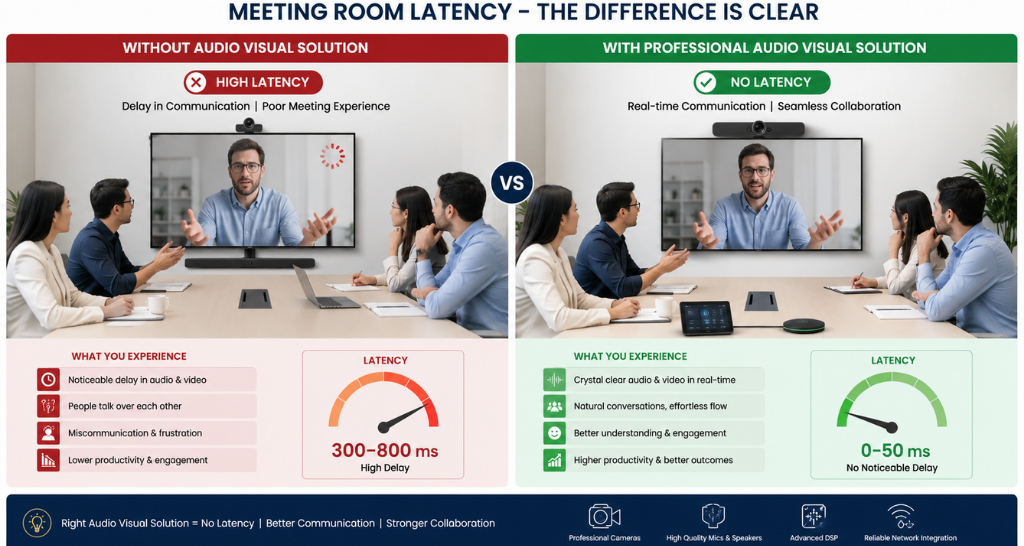
Meeting Room Latency Explained: Types, Causes, and Solutions
Workplaces rely on seamless collaboration to keep teams connected, whether employees are working from the office or remotely. From client presentations to daily team discussions, meeting rooms are expected to deliver clear audio, smooth video, and uninterrupted screen sharing. However, many organizations experience delays that negatively impact communication and productivity. This is where Audio Video Latency becomes a critical factor and Meeting Room Latency.
Audio Video Latency refers to the delay between transmitting and receiving audio or video signals in a meeting room environment. Even a slight delay can disrupt conversations, cause lip-sync issues, interrupt presentations, and reduce the overall meeting experience. As businesses continue investing in Corporate Meeting Room Technology, minimizing latency has become essential for ensuring efficient collaboration.
Whether your organization uses wired systems or Hybrid meeting rooms, understanding the causes of latency can help you improve meeting performance and avoid communication problems. This guide explains the different types of latency, the reasons behind it, and practical ways to reduce delays for a better meeting experience.
What is Meeting Room Latency?
Meeting room latency is the time delay between an action performed by a participant and when that action is experienced by others. For example, when a speaker talks into a microphone but the audience hears the sound after a noticeable delay, the issue is caused by Audio Video Latency.
Similarly, delays can occur while sharing presentations, displaying video feeds, or switching between cameras. These interruptions reduce communication quality and make meetings less productive.
Modern businesses depend on reliable Meeting room technology to deliver real-time collaboration. A well-designed meeting room should ensure that audio, video, and shared content are synchronized without noticeable delays. Reducing Audio Video Latency improves communication, supports faster decision-making, and creates a more professional meeting environment.
Why Low Latency Matters in Meeting Rooms
| Without Optimization | With AV Integration |
|---|---|
| Audio delay & echo | Real-time clear audio |
| Video lag | Smooth synced video |
| Interrupted meetings | Seamless collaboration |
Every second counts during business discussions. High Audio Video Latency can create confusion, interrupt conversations, and affect the professionalism of client meetings and Meeting Room Latency
Low latency offers several advantages:
- Natural conversations without noticeable delays.
- Better synchronization between audio and video.
- Faster screen sharing during presentations.
- Improved collaboration between in-office and remote participants.
- Enhanced user experience for video meetings.
Organizations implementing AV Integration for Meeting Rooms prioritize low-latency communication because it directly improves productivity and user satisfaction.
Types of Meeting Room Latency
Understanding different types of latency helps organizations identify where delays occur.
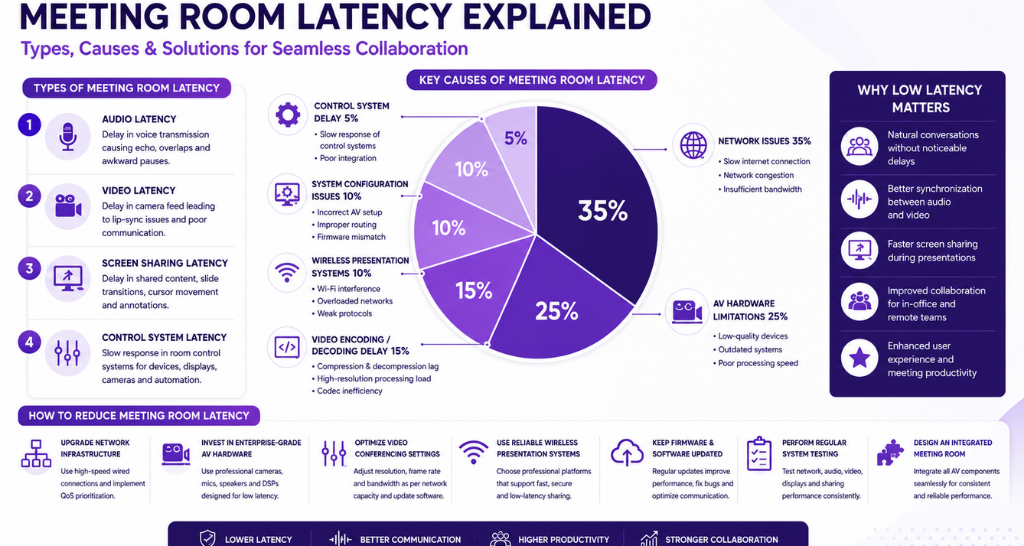
1. Audio Latency
Audio latency occurs when spoken words reach participants after a delay. High Audio Video Latency in audio communication often results in overlapping conversations and awkward pauses.
Common symptoms include:
- Echo
- Delayed voice
- Choppy communication
- Poor conversation flow
2. Video Latency
Video latency happens when camera feeds appear several milliseconds or seconds behind live action. Excessive Audio Video Latency creates noticeable lip-sync issues, making communication uncomfortable during meetings.
Video latency becomes more apparent during live demonstrations, interviews, or executive presentations.
3. Screen Sharing Latency
Presentation delays occur when shared content appears slowly on meeting room displays and Meeting Room Latency.
Participants may notice:
- Delayed slide transitions
- Lag while demonstrating software
- Slow cursor movement
- Delayed annotations
Organizations using Video conferencing systems should ensure screen-sharing technology supports low-latency performance for smoother collaboration.
4. Control System Latency
Control panels manage displays, cameras, microphones, lighting, and room automation. When commands respond slowly, users experience operational delays caused by Audio Video Latency within the control infrastructure.
Although often overlooked, control latency affects the overall user experience.
Common Causes of Meeting Room Latency
| Cause | Problem | Solution |
|---|---|---|
| Slow Network | Audio/video delay | Upgrade to wired high-speed network |
| Network Congestion | Lag in meetings | Use QoS prioritization |
| Poor AV Hardware | Low performance | Use enterprise-grade AV devices |
Several technical and environmental factors contribute to increased latency.
Slow Network Connection
Network speed is one of the biggest reasons for Audio Video Latency. Limited bandwidth prevents audio and video packets from reaching participants quickly and Meeting Room Latency
Slow internet connections can result in:
- Delayed audio
- Frozen video
- Interrupted screen sharing
- Poor meeting quality
Upgrading to high-speed wired connectivity significantly improves meeting performance.
High Network Congestion
Even fast networks can suffer when multiple users consume excessive bandwidth simultaneously.
Large file transfers, cloud backups, software updates, and streaming services increase congestion, causing Audio Video Latency across meeting room devices.
Implementing network prioritization through Quality of Service (QoS) helps reduce communication delays during business meetings.
Poor AV Hardware
Outdated microphones, cameras, displays, speakers, and processors often struggle to process media efficiently and Meeting Room Latency
Low-quality hardware increases Audio Video Latency because devices require additional processing time before transmitting signals.
Modern Audio visual solutions integrate enterprise-grade equipment designed to minimize latency while delivering superior audio and video quality.
Low-Performance Video Conferencing Devices
Not every conferencing device is built for professional collaboration. Entry-level webcams, microphones, and conferencing systems often introduce additional Audio Video Latency due to slower processors and limited encoding capabilities.
Businesses investing in Corporate Meeting Room Technology should select enterprise-grade conferencing hardware capable of processing high-definition audio and video with minimal delay.
Wireless Presentation Systems
Wireless presentation technology provides convenience but can sometimes introduce additional latency if devices rely on overloaded wireless networks or outdated transmission protocols.
Although modern wireless systems have significantly improved, poorly configured devices may still increase Audio Video Latency, especially when multiple users attempt simultaneous screen sharing.
Choosing reliable wireless presentation platforms and maintaining strong Wi-Fi performance helps reduce delays while supporting flexible collaboration in Hybrid meeting rooms.
Meeting Room Latency Explained: Types, Causes, and Solutions
| Type of Latency | What Happens | Common Causes | Impact on Meetings |
|---|---|---|---|
| Audio Latency | Voice delay between speaker and listener | Poor network, low-quality mic/speaker, encoding delay | Echo, overlapping speech, confusion in conversation |
| Video Latency | Video feed appears late or out of sync | High compression, weak internet, outdated camera systems | Lip-sync issues, poor communication experience |
| Screen Sharing Latency | Slides or content load slowly | Network congestion, wireless sharing issues | Delayed presentations, lag in collaboration |
| Control System Latency | Devices respond slowly to commands | Poor AV integration, outdated control processors | Delay in switching cameras, lights, displays |
Video Encoding and Decoding Delay
Every video conferencing platform compresses and decompresses audio and video data before transmitting it to participants. This process, known as encoding and decoding, can introduce Audio Video Latency if the hardware or software cannot process data efficiently.
High-resolution video, multiple camera feeds, and advanced collaboration features require greater processing power. If conferencing devices are outdated or overloaded, encoding delays become more noticeable. Selecting enterprise-grade codecs and regularly updating firmware can significantly reduce Audio Video Latency while improving the overall meeting experience and Meeting Room Latency.
Incorrect AV System Configuration
Even premium equipment may fail to deliver optimal performance if it is configured incorrectly. Improper audio routing, mismatched display resolutions, incompatible firmware versions, and incorrect network settings often increase Audio Video Latency and Video wall display
Professional AV Integration for Meeting Rooms ensures every device works together seamlessly. Proper configuration minimizes delays, improves synchronization between audio and video, and provides a smoother user experience during presentations and virtual meetings.
How to Reduce Meeting Room Latency
Reducing latency requires a combination of reliable infrastructure, optimized hardware, and professional system design. The following best practices can help organizations improve meeting room performance and Meeting Room Latency.
Upgrade Network Infrastructure
A stable, high-speed wired network provides the foundation for low-latency communication. Ethernet connections generally perform better than wireless networks because they offer lower packet loss and more consistent bandwidth.
Organizations should also prioritize meeting room traffic using Quality of Service (QoS) settings to ensure conferencing applications receive the bandwidth they need and Meeting Room Latency
Implementing these improvements helps reduce Audio Video Latency and creates a more responsive collaboration environment.
Invest in Enterprise-Grade AV Hardware
Professional-grade microphones, cameras, speakers, DSP processors, and control systems are specifically designed for business collaboration.
Unlike consumer devices, enterprise hardware processes audio and video more efficiently, reducing Audio Video Latency while delivering superior sound quality and clearer visuals and Meeting Room Latency.
Choosing certified conferencing equipment also improves long-term reliability and scalability.
Optimize Video Conferencing Settings
Many conferencing platforms allow administrators to adjust video resolution, frame rates, and bandwidth usage.
Optimizing these settings according to available network capacity reduces unnecessary processing and helps minimize Audio Video Latency without compromising communication quality.
Regular software updates also improve codec performance and system stability.
Select Reliable Wireless Presentation Systems
Wireless collaboration has become an essential part of modern workplaces, but system quality matters.
Businesses should deploy professional wireless presentation platforms that support fast content sharing with minimal delay. Reliable hardware and secure wireless protocols reduce Audio Video Latency while improving presentation efficiency.
Keep Firmware and Software Updated
Manufacturers regularly release firmware updates that improve device performance, fix bugs, and optimize communication protocols.
Ignoring updates may leave systems vulnerable to performance issues that increase Audio Video Latency. Scheduling routine maintenance ensures all meeting room devices continue operating efficiently.
Perform Regular System Testing
Routine testing helps identify performance bottlenecks before they affect important meetings.
IT teams should regularly evaluate:
- Network performance
- Audio synchronization
- Camera response time
- Display refresh speed
- Screen sharing performance
Proactive testing prevents unexpected increases in Audio Video Latency and ensures meeting rooms remain reliable.
Design an Integrated Meeting Room
Instead of purchasing standalone devices, organizations should adopt an integrated approach where displays, microphones, cameras, control systems, and conferencing platforms work together seamlessly.
Professional integration reduces compatibility issues and ensures consistent performance across every meeting room.
This approach forms the foundation of effective Meeting Room Latency Solutions, helping businesses deliver dependable collaboration experiences.
Maintaining Low Latency Meeting Rooms :
Maintaining excellent meeting performance requires continuous monitoring and optimization. Organizations should:
- Use wired network connections whenever possible.
- Deploy enterprise-grade conferencing hardware.
- Monitor bandwidth utilization regularly.
- Update firmware and software on schedule.
- Train employees to use meeting room equipment correctly.
- Schedule preventive maintenance for AV systems.
- Test audio and video quality before important meetings.
Following these best practices minimizes Audio Video Latency while extending the lifespan of meeting room technology investments.
Why Low Latency Matters for Business Collaboration ?
Modern businesses rely on real-time communication to make faster decisions and improve productivity. Delays in audio or video can interrupt conversations, reduce engagement, and negatively affect customer interactions.
Low Audio Video Latency enables:
- More productive hybrid meetings
- Better communication between remote and office employees
- Faster presentations
- Improved client interactions
- Higher employee satisfaction
Organizations that invest in Meeting Room Latency Solutions gain a competitive advantage by delivering seamless collaboration experiences across departments and locations.
Why Choose Vallect for Meeting Room Solutions ?
Vallect delivers advanced meeting room solutions designed to eliminate communication delays and improve collaboration across modern workplaces. With strong expertise in reducing Audio Video Latency, Vallect ensures smooth, real time communication for both in office and remote teams.
The company specializes in AV Integration for Meeting Rooms, combining audio, video, displays, and control systems into a single seamless ecosystem. This integration helps reduce complexity and improves overall system performance.
Vallect also focuses on modern Corporate Meeting Room Technology, enabling businesses to conduct meetings without interruptions or lag. Every setup is optimized to deliver clear audio and synchronized video experiences.
Custom Meeting Room Latency Solutions are designed based on business requirements, ensuring every space from small rooms to large conference halls operates efficiently. This is especially important for Hybrid meeting rooms, where remote collaboration demands high performance and reliability.
By combining innovation, integration, and support, Vallect ensures organizations experience faster communication, better productivity, and a professional meeting environment.