
 admin
July 6, 2026
admin
July 6, 2026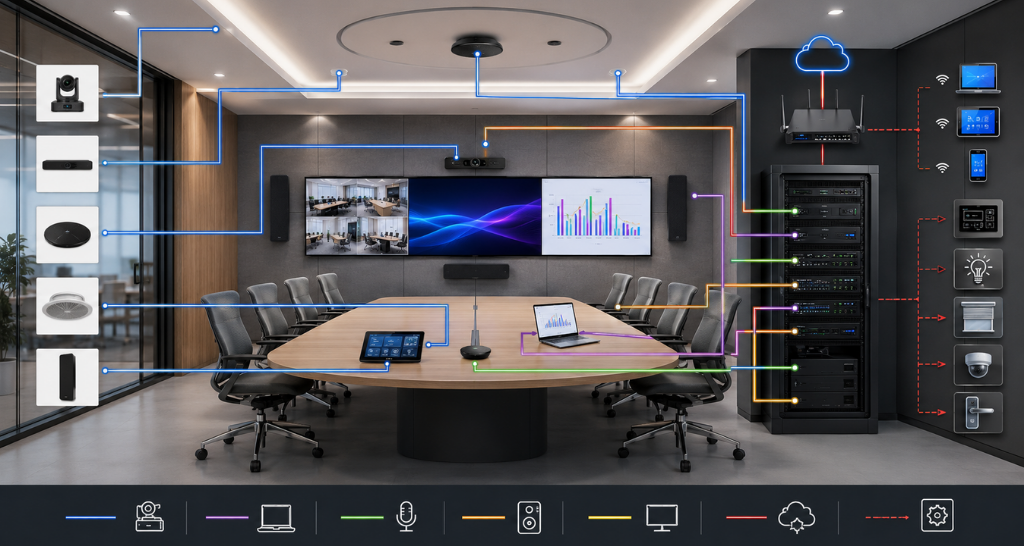
Role of Video Conferencing System in Meeting Room Solutions
Workplaces are no longer limited by physical boundaries. With businesses adopting hybrid work models, global teams, and remote collaboration, meeting rooms have transformed from simple discussion spaces into advanced communication hubs. Organizations now require technology that enables seamless interaction between employees, clients, partners, and stakeholders regardless of their location.
A Video Conferencing System for Meeting Rooms has become an essential part of modern workplace infrastructure by combining high-quality video, clear audio, and intelligent collaboration features. It allows teams to conduct virtual meetings, presentations, training sessions, and client discussions with the same effectiveness as face-to-face communication.
Traditional meeting setups often face challenges such as poor audio quality, limited connectivity, manual device setup, and lack of collaboration features. A professionally designed Video Conferencing System for Meeting Rooms eliminates these limitations by integrating cameras, microphones, displays, speakers, and collaboration platforms into one easy-to-use solution.
As businesses focus on improving productivity and communication, Smart Meeting Room Solutions are becoming a key investment for enterprises looking to create flexible, technology-driven workspaces.
What is a Video Conferencing System for Meeting Rooms?
A Video Conferencing System for Meeting Rooms is an integrated technology solution that enables real-time audio and video communication between participants in different locations. It combines hardware and software components to create an interactive meeting environment where users can communicate, share content, and collaborate effectively.
Unlike basic online calling applications, a professional Video Conferencing System for Meeting Rooms is designed specifically for corporate environments. It provides better audio pickup, improved video quality, centralized control, and seamless integration with enterprise collaboration platforms.
A complete system generally includes cameras, microphones, speakers, displays, processors, control interfaces, and network connectivity. These components work together to deliver reliable Meeting Room Video Conferencing Solutions for organizations of all sizes.
Modern enterprises use these systems in:
- Conference rooms
- Boardrooms
- Training rooms
- Huddle spaces
- Executive meeting rooms
- Collaboration areas
With the growth of hybrid work, a Corporate Video Conferencing System has become a necessity rather than an optional technology.
Why is a Video Conferencing System Important?
The way businesses communicate has changed significantly. Employees, customers, and partners may be located across different cities or countries, making effective collaboration a challenge.
A Video Conferencing System for Meeting Rooms solves these challenges by creating a connected environment where everyone can participate equally.
1. Supports Hybrid Work
Employees can join meetings remotely while maintaining the same level of interaction as participants present in the room and Auditorium AV Solutions
2. Improves Communication Quality
Poor audio and unclear video can reduce meeting effectiveness. Professional systems provide crystal-clear communication through advanced cameras, microphones, and audio processing.
3. Saves Time and Travel Costs
Businesses can conduct client meetings, internal discussions, and training sessions without requiring physical travel.
4. Enhances Collaboration
Features such as wireless content sharing, interactive displays, and digital whiteboarding improve teamwork.
5. Creates Professional Meeting Experiences
A well-designed Corporate Video Conferencing System improves client interactions and presents a more professional brand image.
6. Increases Meeting Efficiency
One-touch controls, automated device connections, and smart room features reduce setup time and technical difficulties.
Role of Video Conferencing in Smart Meeting Room Solutions :
A modern workplace requires more than just a conference camera and display. Smart Meeting Room Solutions combine automation, collaboration technology, and intelligent controls to create efficient meeting environments.
A Video Conferencing System for Meeting Rooms acts as the central communication platform by connecting:
- Remote participants
- In-room attendees
- Presentation content
- Audio systems
- Room automation systems
For example, when a meeting begins, the system can automatically activate the camera, microphone, display, and conferencing platform. This creates a smooth user experience without complicated manual setup.
Organizations implementing Meeting Room Video Conferencing Solutions can improve productivity by making meetings faster, simpler, and more engaging.
How Does a Video Conferencing System for Meeting Rooms Work?
A Video Conferencing System for Meeting Rooms works by combining multiple hardware and software technologies to capture, process, transmit, and display communication data.
Step 1: Capturing Audio and Video
Cameras capture participant video while microphones collect voice signals from the meeting room.
Modern cameras use technologies such as:
- Auto framing
- Speaker tracking
- AI-based participant detection
- Wide-angle viewing
Microphones use advanced noise cancellation and beamforming technology to capture clear speech.
Step 2: Processing Signals
The captured audio and video signals are processed through codecs, processors, and collaboration devices.
The system optimizes:
- Video resolution
- Audio clarity
- Network performance
- Data compression
This ensures smooth communication even when participants are connecting remotely.
Step 3: Network Transmission
The processed information is transmitted through the internet or enterprise network infrastructure to remote participants.
A reliable network connection is essential for maintaining:
- Low latency
- Stable video quality
- Real-time interaction
Step 4: Display and Audio Output
The received information is displayed on meeting room screens or LED Displays, while speakers reproduce clear audio for participants.
For larger spaces, organizations often combine conferencing systems with advanced AV infrastructure such as professional display solutions and integrated room controls.
Conventional Meeting Room vs Video Conferencing Enabled Meeting Room :
| Feature | Conventional Meeting Room | Video Conferencing Enabled Room |
|---|---|---|
| Remote Collaboration | Limited | Seamless global communication |
| Audio Quality | Basic microphones | Professional audio systems |
| Video Quality | Standard camera setup | HD/4K intelligent cameras |
| Content Sharing | Manual connection | Wireless and instant sharing |
| User Experience | Complex setup | One-touch operation |
| Scalability | Limited | Easily expandable |
| Meeting Efficiency | More preparation time | Faster collaboration |
A professionally installed Video Conferencing System for Meeting Rooms transforms traditional spaces into intelligent collaboration environments.
Key Components and Technologies of Video Conferencing Systems :
A successful Video Conferencing System for Meeting Rooms depends on multiple hardware and software components working together. Each element plays an important role in delivering smooth communication, high-quality collaboration, and reliable meeting experiences.
1. PTZ and AI-Powered Cameras
Cameras are one of the most important parts of a modern conferencing setup. Advanced PTZ (Pan-Tilt-Zoom) cameras provide wide-angle coverage, automatic framing, and speaker tracking.
AI-powered cameras can identify participants, adjust focus automatically, and ensure every person in the room remains visible during discussions.
2. Professional Microphones
Clear communication requires high quality audio capture. Table microphones, ceiling microphones, and beamforming microphones help capture voices from different areas of the room while reducing background noise.
3. Speakers and Audio DSP
Professional speakers combined with Digital Signal Processors (DSP) deliver clear and balanced sound. DSP technology removes echo, controls audio levels, and improves speech intelligibility.
4. Interactive Displays and LED Displays
Visual communication depends on high-quality display technology. Large screens, interactive panels, and LED Displays allow participants to view presentations, dashboards, and remote attendees clearly.
5. Video Conferencing Software Platforms
Hardware works together with collaboration platforms that support online meetings, content sharing, and team communication.
Common features include:
- Screen sharing
- Meeting scheduling
- Recording
- Chat integration
- Remote participation
6. Room Control Systems
Touch panels and automation systems simplify meeting room operations. Users can start meetings, control displays, adjust audio, and manage connected devices from a single interface.
7. Network Infrastructure
A stable network is essential for smooth video communication. Proper bandwidth, secure connectivity, and network optimization ensure uninterrupted meeting performance.
These technologies together create reliable Video Conferencing Equipment for Meeting Rooms that supports modern business requirements.
Benefits of Video Conferencing System for Meeting Rooms :
Implementing a professional Video Conferencing System for Meeting Rooms provides organizations with multiple operational advantages.
1. Improved Collaboration
Teams can communicate effectively regardless of location. Remote employees, clients, and partners can participate in meetings with the same level of interaction as in-room attendees and Conference Board Room AV Solution
2. Increased Productivity
Automated meeting controls and simplified connectivity reduce the time spent on technical setup. Employees can start meetings quickly and focus on important discussions.
3. Better Decision-Making
High-quality video, clear audio, and real-time data sharing help teams analyze information faster and make informed decisions.
4. Reduced Operational Costs
Businesses can minimize travel expenses by conducting virtual meetings, training sessions, and client presentations remotely.
5. Enhanced Employee Experience
Modern meeting environments create smoother collaboration experiences and improve employee satisfaction.
6. Scalability for Future Growth
A properly designed Corporate Video Conferencing System can be expanded as organizations add more meeting spaces or adopt new technologies.
7. Supports Hybrid Workplace Models
With remote and in-office employees working together, Smart Meeting Room Solutions ensure equal participation for every attendee.
Facts and Figures About Video Conferencing Technology :
The growing adoption of hybrid work has increased the demand for advanced collaboration solutions.
- Modern video conferencing systems support HD and 4K video quality for professional communication.
- AI-powered cameras can automatically track speakers and improve participant visibility.
- Advanced microphone systems can capture voices from larger meeting spaces while reducing unwanted noise.
- Cloud-based collaboration platforms allow employees to connect from multiple locations worldwide.
- Automated meeting rooms can reduce setup time and improve overall workplace efficiency.
Organizations investing in Meeting Room Video Conferencing Solutions are creating flexible workplaces that support future communication requirements.
How Vallect Helps with Video Conferencing Solutions ?
Vallect provides end-to-end solutions for designing and implementing advanced communication environments for modern organizations. From small meeting rooms to large enterprise spaces, Vallect delivers customized solutions based on business requirements.
Our expertise includes:
- Requirement analysis
- Site surveys
- AV system design
- Hardware selection
- Installation and integration
- Testing and commissioning
- User training
- Annual maintenance support
Vallect focuses on creating seamless collaboration environments by combining video conferencing, audio systems, displays, automation, and networking technologies.
For organizations looking for complete Audio Visual Integration Solutions, Vallect delivers scalable and reliable systems designed around specific workspace requirements.
We also specialize in dedicated solutions such as Conference Board Room AV Solutions for executive spaces and Auditorium AV Solutions for large presentation environments.
By integrating advanced conferencing technology with automation features like Lighting Control System, Vallect helps businesses create intelligent, efficient, and future-ready meeting spaces.