
 admin
July 15, 2026
admin
July 15, 2026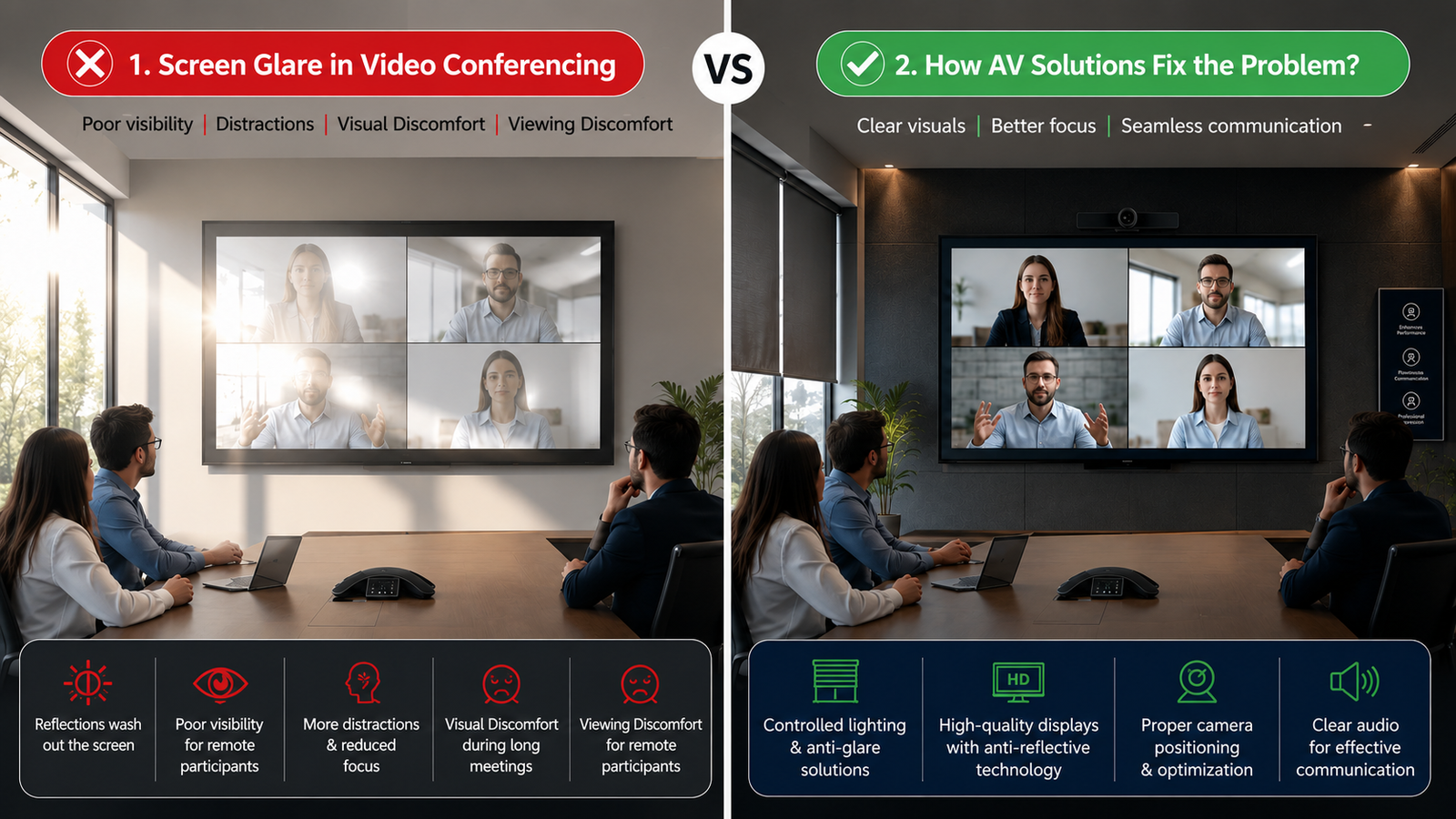
Struggling with Screen Glare During Video Conferencing: How AV Solutions Fix it?
Video conferencing has become an essential part of modern workplaces, boardrooms, huddle spaces, and hybrid meeting environments. However, even the most advanced camera, display, and conferencing platform can deliver a poor experience when participants cannot clearly see the screen and AV Solutions
One of the most common reasons behind poor visibility is glare. Reflections from windows, ceiling lights, polished surfaces, and incorrectly positioned lighting can make content appear washed out, distorted, or difficult to read. As a result, participants may struggle to follow presentations, read shared documents, view data, or engage effectively in a meeting and AV Solutions.
This is where AV Solutions play an important role. Rather than treating glare as an isolated display issue, a professionally designed AV system looks at the entire meeting environment, including the screen, lighting, room layout, viewing angles, cameras, and control systems.
The right AV design can reduce reflections, improve visibility, enhance screen performance, and create a more comfortable video conferencing experience.
What Causes Screen Glare During Video Conferencing?
Screen glare occurs when external light reflects off the surface of a display and enters the viewer’s line of sight. This reflected light competes with the content displayed on the screen, making it harder for participants to see clearly with AV Solutions.
Several factors can contribute to this problem:
1. Direct Sunlight
Large windows placed opposite or near the display can allow sunlight to fall directly on the screen. The intensity of natural light changes throughout the day, making the visibility problem worse at certain times.
2. Poorly Positioned Ceiling Lights
Bright ceiling lights positioned directly above or in front of the screen can create reflections. In some meeting rooms, highly reflective lighting fixtures can make the entire screen appear bright and uncomfortable to view.
3. Incorrect Display Positioning
Even a high-quality display can create visibility issues if it is installed at the wrong angle. A screen facing a window or a strong light source is more likely to reflect light toward participants.
4. Reflective Room Surfaces
Glass walls, polished tables, glossy furniture, and shiny surfaces can reflect light around the room. These reflections may reach the display or create additional visual distractions.
5. Excessive Room Brightness
A room that is too bright can reduce the perceived contrast of the display. While sufficient lighting is important for cameras and participants, uncontrolled lighting can negatively affect screen visibility with AV Solutions.
These issues can lead to common Screen Visibility Problems, including difficulty reading text, reduced contrast, eye strain, and poor visibility of shared content.
Why Screen Glare Is a Serious Video Conferencing Problem?
Glare is more than a minor visual inconvenience. In a professional meeting, poor visibility can directly affect communication and decision-making.
Imagine a boardroom where a team is reviewing financial data. The presenter shares a detailed report, but sunlight is reflecting across the display. Participants at one side of the room cannot clearly read the numbers. The meeting continues, but the information is not being effectively communicated.
The same issue can occur during:
- Online presentations
- Board meetings
- Training sessions
- Hybrid conferences
- Remote collaboration
- Data analysis meetings
- Product demonstrations
- Executive reviews
When participants cannot see the content clearly, they may repeatedly ask for the screen to be adjusted, move around to find a better viewing angle, or stop engaging with the presentation altogether. A well-designed ELV System can help create a more efficient and connected meeting environment.
A professional AV design addresses these challenges before they affect the meeting experience.
How AV Solutions Fix Screen Glare Problems?
The key advantage of professional AV Solutions is that they do not rely on a single device to solve a complex room problem. Instead, multiple technologies and design elements work together to improve visibility.
1. Selecting the Right Display for the Room
The first step is selecting a display suitable for the room’s size, lighting conditions, viewing distance, and purpose.
A display with suitable brightness and contrast can perform better in bright environments. However, simply choosing the brightest screen is not always the right answer. Excessive brightness can also create discomfort and visual fatigue and how AV solutions fix it.
Professional AV consultants evaluate the room environment and recommend the right display technology based on actual usage conditions.
Depending on the application, the solution may include:
- Professional commercial displays
- LED video walls
- Interactive displays
- Projection systems
- High-performance presentation screens
The objective is to create a balanced visual experience where content remains clear without creating unnecessary reflections or brightness issues.
2. Optimising Screen Placement
Screen placement has a major impact on visibility.
A professional AV design considers:
- Window locations
- Natural light direction
- Ceiling lighting
- Participant seating
- Viewing angles
- Camera positioning
- Screen height
The display should ideally be positioned to minimise direct light reflection. Even small changes in screen orientation or room layout can significantly improve visibility.
This is one of the most effective Screen Glare Solutions because it addresses the source of the problem instead of trying to compensate for it later.
3. Integrating Lighting Control
Lighting is one of the most important elements in a video conferencing environment.
A modern AV Solutions can integrate with lighting control systems to adjust room lighting based on the activity taking place. For example, during a presentation, lights near the display can be dimmed while maintaining suitable illumination for participants and cameras.
Different lighting scenes can be created for:
- Video conferencing
- Presentations
- Training sessions
- Board meetings
- Hybrid collaboration
- Events
This allows the room to adapt to different requirements without requiring users to manually adjust multiple lights.
4. Using Automated Blinds and Shading Systems
Natural light can improve the appearance of a room, but uncontrolled sunlight can create serious glare issues and AV Solutions.
Motorised blinds and shading systems can be integrated into the AV environment to automatically control sunlight entering the room. These systems can be scheduled or connected with room control systems.
For example, when a video conferencing session begins, the system can automatically:
- Lower the blinds
- Adjust the lighting
- Set the display to the required mode
- Activate the conferencing equipment
This creates a more consistent visual environment throughout the meeting.
5. Optimising Display Brightness and Contrast
Display settings also play an important role in improving visibility.
A professional AV system can be configured to deliver suitable brightness, contrast, and picture settings based on the room environment. This ensures that content remains visible without making the screen unnecessarily bright and AV Solutions.
For large LED displays, factors such as pixel pitch, brightness, viewing distance, and display calibration must also be considered.
The objective is not simply to make the display brighter. The objective is to achieve a comfortable balance between clarity, contrast, and room lighting.
6. Integrating Centralised Room Control
A centralised room control system makes it easier to manage multiple AV components from a single interface.
With the right AV control system, users can control:
- Displays
- Video conferencing systems
- Lighting
- Motorised blinds
- Cameras
- Audio systems
- Room presets
A user may simply select a “Video Conference” mode, and the room can automatically adjust itself for the meeting.
This approach helps eliminate manual errors and creates a consistent experience every time the room is used and AV Solutions.
How AV Solutions for Video Conferencing Improve the User Experience?
A well-designed meeting room should not require users to become AV experts before starting a meeting.
Poorly designed systems often create problems such as:
- Reflections on the display
- Incorrect lighting
- Poor camera exposure
- Difficult screen sharing
- Unclear audio
- Complicated controls
Professional AV Solutions for Video Conferencing bring these elements together into a coordinated system.
For example, when a meeting begins, the room can automatically activate the correct display, adjust the lighting, control window shades, position cameras, and start the required conferencing platform.
This creates a smoother experience for both in-room and remote participants and AV Solutions.
The result is a meeting environment where technology supports communication instead of becoming a distraction.
What Should Businesses Consider When Designing an AV System?
Every meeting room is different. A small huddle room will have different requirements from a large boardroom or executive conference room and AV Solutions.
Before designing a system, businesses should consider:
Room Size
The size of the room determines the display size, audio requirements, camera coverage, and viewing distance.
Natural Lighting
The location and size of windows can significantly impact screen visibility and camera performance.
Number of Participants
A larger number of participants may require multiple displays, additional cameras, advanced microphones, and centralised control.
Meeting Type
A room used for presentations may require a different setup from a room designed primarily for hybrid collaboration.
Future Scalability
The AV system should be flexible enough to support future technology upgrades and changing business requirements.
These considerations help ensure that Meeting Room AV Solutions are designed around the actual needs of the users rather than simply installing individual products.
How vallect helps with AV solution ?
At Vallect, we understand that successful AV integration is not simply about installing a display, camera, or microphone. It is about designing an environment where every technology works together to improve communication.
Our approach begins with understanding the room, the users, and the organisation’s meeting requirements.
We evaluate factors such as:
- Room dimensions
- Natural and artificial lighting
- Seating arrangement
- Display placement
- Viewing angles
- Camera coverage
- Audio requirements
- Control preferences
- Future expansion needs
Based on this assessment, we design integrated AV Solutions that address the complete meeting experience.
Our solutions can combine displays, video conferencing systems, professional audio, room control, lighting integration, and other technologies into a unified environment.
This means businesses do not have to deal with isolated technology problems. Instead, the entire room can be designed as one connected system.
For organisations experiencing Screen Visibility Problems, our team can help identify the real cause of the issue and recommend practical solutions. Whether the problem is related to lighting, display placement, room design, or system integration, the right solution begins with understanding the environment.
Create Clearer, More Comfortable Video Conferencing Experiences
Screen glare may appear to be a small issue, but it can have a significant impact on communication, productivity, and user experience.
A poorly positioned display, uncontrolled lighting, or excessive reflections can make important content difficult to see. Over time, these small frustrations can affect the overall effectiveness of meetings.
The right AV Solutions take a complete approach to the problem. From selecting the right display and optimising screen placement to integrating lighting control, automated blinds, and centralised room management, professional AV design can significantly improve screen visibility.
With the right technology partner, businesses can move beyond temporary fixes and create meeting environments with solutions such as LED Video Walls, designed for clarity, comfort, and collaboration.
If your organisation is facing a recurring video Conferencing problem caused by screen glare or poor visibility, Vallect can help design and integrate a solution tailored to your space.
Because a better meeting experience does not begin with simply adding more technology. It begins with designing the right technology to work together.