
 admin
July 27, 2026
admin
July 27, 2026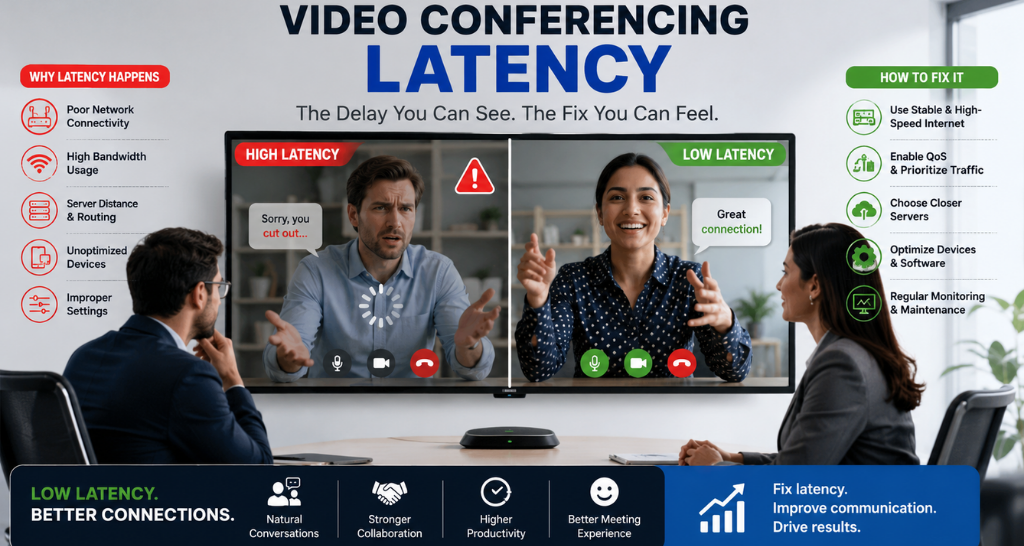
Why Video Conferencing Latency Happens and How to Fix It with AV Solutions?
Video conferencing has become the backbone of modern business communication. Whether organizations are conducting client presentations, hybrid meetings, employee training, or boardroom discussions, seamless audio and video are critical for productive collaboration. However, one common challenge continues to affect meeting quality Video Conferencing Latency.
Latency refers to the delay between when a participant speaks or shares content and when others receive it. Even a delay of a few hundred milliseconds can cause participants to talk over one another, experience frozen video, or struggle to collaborate effectively. These interruptions reduce meeting productivity, create communication gaps, and leave a poor impression on clients and stakeholders.
The good news is that most latency issues are preventable. Modern AV Solutions combine professional hardware, optimized network design, intelligent signal processing, and system integration to minimize delays and deliver a smooth conferencing experience.
In this guide, we’ll explain why Video Conferencing Latency occurs, how professional AV Solutions eliminate these problems, and why investing in the right technology creates future-ready meeting spaces.
What is Video Conferencing Latency?
Video Conferencing Latency is the time delay between sending and receiving audio, video, or shared content during an online meeting. Every conferencing platform processes information before transmitting it across a network. If any stage of this process takes longer than expected, participants experience noticeable delays.
In a modern meeting room, audio, video, presentations, and collaboration data pass through multiple devices before reaching remote participants. Professional AV Solutions ensure these components work together efficiently to minimize processing delays.
A typical meeting environment includes:
- Cameras
- Microphones
- Speakers
- Displays
- Control systems
- Network switches
- Conferencing platforms
Without proper integration, these devices may introduce unnecessary delays that affect communication quality.
Why is Low Latency Important?
A successful virtual meeting depends on real-time interaction. When conversations are delayed, participants often interrupt each other, misunderstand responses, or lose focus.
Professional AV Solutions help organizations maintain natural communication by reducing delays and improving synchronization between audio and video.
Benefits of low latency include:
- Faster communication
- Better collaboration
- Improved meeting productivity
- Higher customer satisfaction
- Professional user experience
- More effective hybrid meetings
Organizations implementing reliable AV Solutions experience smoother communication across boardrooms, meeting rooms, training facilities, and collaboration spaces.
Why Does Video Conferencing Latency Happen?
Several technical factors contribute to Video Conferencing Latency. Understanding these causes is the first step toward selecting the right Video Conferencing Latency Solution.
1. Slow Network Connectivity
Poor bandwidth, network congestion, or unstable internet connections are among the most common causes of latency. When data packets are delayed, meeting quality decreases.
Professional AV Solutions optimize network infrastructure to prioritize conferencing traffic.
2. Low-Quality Hardware
Consumer-grade cameras, microphones, and conferencing devices often have slower processors and limited optimization capabilities.
Enterprise-grade AV Solutions use professional equipment designed for continuous business communication.
3. Audio and Video Processing Delays
Every camera, microphone, codec, and processor requires time to capture and process signals. Older equipment increases processing delays.
A modern Video Conferencing Latency Solution uses advanced DSPs and hardware acceleration to reduce processing time.
4. Poor Room Acoustics
Echo and background noise force conferencing platforms to perform additional audio processing, increasing latency.
Professional AV Solutions combine acoustic design with intelligent microphones to improve communication quality.
5. Multiple Signal Conversions
Converting video between different resolutions and formats introduces additional processing delays.
Integrated AV Solutions minimize unnecessary signal conversions and maintain consistent video quality.
6. Wireless Interference
Wireless presentation devices, congested Wi-Fi networks, and signal interference may increase response times.
Proper network planning is an essential part of every Video Conferencing Latency Solution.
How AV Solutions Work?
Professional AV Solutions combine multiple technologies to deliver synchronized communication.
Step 1 – Capture
Cameras capture participant video while microphones record speech.
Step 2 – Processing
Audio DSPs remove echo and background noise.
Video processors optimize image quality before transmission.
Step 3 – Compression
Codecs compress audio and video while maintaining quality, reducing bandwidth requirements.
Step 4 – Transmission
Optimized data travels through the enterprise network or cloud conferencing platform.
Step 5 – Reception
Remote participants receive synchronized audio, video, and presentation content with minimal delay.
This integrated workflow is the foundation of an effective Video Conferencing Latency Solution.
Average Meeting Setup vs Professional AV Solutions:
| Feature | Average Meeting Setup | Professional AV Solutions |
| Audio Quality | Basic microphones | DSP-optimized audio |
| Video Quality | Consumer webcams | Professional PTZ cameras |
| Latency | Higher delays | Significantly reduced |
| Content Sharing | Manual | Wireless and integrated |
| Scalability | Limited | Enterprise-ready |
| Reliability | Variable | Consistent performance |
| User Experience | Frequent interruptions | Seamless collaboration |
Common Signs You Need a Video Conferencing Latency Solution:
Many organizations experience latency without realizing the root cause. Common warning signs include:
- Participants talking over each other
- Delayed audio responses
- Frozen or choppy video
- Lip-sync issues
- Slow screen sharing
- Echo during meetings
- Audio dropping intermittently
- Delays when switching presenters
If these problems occur regularly, it’s time to invest in professional AV Solutions rather than relying on software settings alone.
Key Components & Technologies That Reduce Video Conferencing Latency:
Eliminating Video Conferencing Latency requires more than a fast internet connection. Professional AV Solutions integrate multiple technologies that work together to capture, process, transmit, and display audio and video with minimal delay.
1. Professional Cameras
Enterprise-grade PTZ (Pan-Tilt-Zoom) and AI-enabled cameras provide faster image processing, auto-framing, speaker tracking, and high-definition video. These cameras reduce processing delays while delivering clear visuals.
2. Digital Signal Processors (DSP)
DSP technology processes audio in real time by removing echo, suppressing background noise, balancing sound levels, and synchronizing audio with video. This is a critical part of any Video Conferencing Latency Solution.
3. Beamforming Microphones
Unlike conventional microphones, beamforming microphones capture voices accurately from different seating positions while filtering unwanted sounds, reducing the need for additional audio processing.
4. Enterprise Network Switches
Managed network switches prioritize conferencing traffic using Quality of Service (QoS), ensuring audio and video packets are transmitted with minimal delay.
5. AV over IP Technology
Modern AV Solutions use AV over IP to transmit audio and video signals across standard network infrastructure. This enables scalable, flexible, and low-latency communication between meeting spaces.
6. Collaboration Platforms
A professional Video Conferencing System works seamlessly with platforms like Microsoft Teams, Zoom, and Google Meet, ensuring stable communication and optimized meeting performance.
7. Display Technology
High-performance displays and Indoor LED Display solutions present presentations, shared content, and remote participants with exceptional clarity while maintaining synchronized visuals.
Benefits of Professional AV Solutions:
Implementing professional AV Solutions provides significant operational advantages beyond reducing latency.
Better Meeting Experience
Smooth communication allows participants to focus on discussions rather than technical interruptions.
Improved Productivity
Employees spend less time troubleshooting equipment and more time collaborating effectively.
Clearer Communication
Professional audio processing eliminates echo and improves speech intelligibility for every participant.
Enhanced Hybrid Collaboration
Remote employees experience the same level of engagement as participants attending meetings in person.
Reduced IT Support
Standardized AV Solutions simplify meeting room management and reduce the number of technical support requests.
Future-Ready Infrastructure
Modern meeting rooms can easily integrate additional displays, cameras, microphones, and collaboration tools as business requirements grow.
Professional Client Experience
High-quality conferencing environments improve presentations, client meetings, and executive discussions, reinforcing a professional business image.
Facts & Figures:
The increasing adoption of hybrid work has made reliable conferencing technology a business necessity.
- A delay of more than 150–200 milliseconds can begin to affect the natural flow of conversations during live meetings.
- Enterprise-grade audio DSPs significantly improve speech clarity by reducing echo and background noise.
- AI-powered conferencing cameras automatically frame participants and improve meeting engagement.
- Network optimization and QoS can dramatically reduce packet loss and improve conferencing performance.
- Integrated AV Solutions help organizations reduce meeting setup time through automation and centralized control.
These advancements demonstrate why investing in a professional Video Conferencing Latency Solution delivers long-term operational benefits.
How Vallect Helps?
Lightomated delivers end-to-end AV Solutions designed to eliminate conferencing challenges and create reliable collaboration environments for modern workplaces.
Our services include:
- Consultation and requirement analysis
- Site survey and room assessment
- Meeting room AV design
- Professional installation and system integration
- Audio DSP tuning
- Camera and microphone optimization
- Network and latency assessment
- Testing and commissioning
- User training
- Preventive maintenance and AMC support
As a provider of TOP AV Integration in Delhi, we combine industry expertise with advanced technologies to build meeting spaces that support seamless communication.
Our portfolio also includes Audio Visual Solutions for boardrooms, auditoriums, collaboration spaces, and enterprise environments. By integrating conferencing systems with ELV Integration infrastructure, organizations benefit from centralized management, enhanced reliability, and improved operational efficiency.
Whether you’re upgrading a single meeting room or deploying enterprise-wide collaboration technology, Lightomated delivers customized AV Solutions that improve communication, minimize latency, and support future business growth.