
 admin
August 18, 2026
admin
August 18, 2026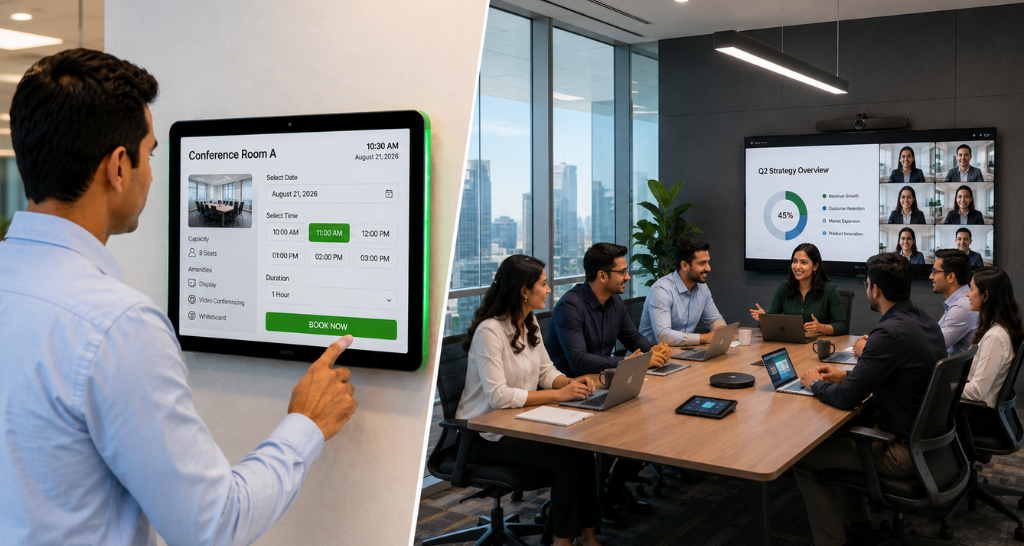
Why Are Meeting Rooms Always Occupied & How Room Scheduling Helps?
“Is this meeting room free?”
“Someone has already booked it.”
“Can we use another room?”
“Why is the room showing available when someone is already inside?”
These situations are surprisingly common in busy offices. Meeting rooms are limited resources, while employees need them throughout the day for internal meetings, client calls, interviews, presentations, and team discussions.
The problem is often not that a company has too few meeting rooms. It is that rooms are not being scheduled and managed efficiently.
A room may be booked for an hour but used for only 20 minutes. Another employee may occupy a room without making a booking. Some rooms may remain reserved even when the organizer cancels the meeting. Employees may also walk around the office looking for an available space instead of checking its real-time status.
As offices increasingly depend on a Video Conferencing System for remote and hybrid meetings, the demand for properly managed meeting spaces has increased as well.
This is where room scheduling and room booking systems become important. They help employees see room availability, reserve spaces, understand room status, and make better use of existing meeting rooms.
Why Are Meeting Rooms Always Occupied?
A meeting room appearing “always occupied” does not necessarily mean every room is being used efficiently.
Several scheduling problems can create this perception.
1. Long Booking With Short Actual Usage
An employee may reserve a room from 10:00 AM to 11:00 AM but finish the meeting at 10:25 AM. If the room remains reserved until 11:00 AM, another employee may not know that it is actually available.
2. Rooms Booked Without Being Used
Employees sometimes reserve rooms in advance and forget to cancel the booking when plans change.
This creates artificial occupancy.
3. Walk-In Room Usage
Some employees may enter an empty room without making a reservation. The room may appear available in the booking system even though someone is already using it.
4. Back-to-Back Meetings
Popular rooms may have meetings scheduled throughout the day, while other rooms remain underused because employees do not have visibility into their availability.
5. Lack of Real-Time Information
If employees cannot easily see whether a room is available, occupied, or reserved, they may waste time checking rooms manually.
A properly configured Video Conferencing System can make a meeting room more useful, but without effective scheduling, employees can still struggle to access that room when needed.
What Is Room Scheduling?
Room scheduling is the process of organizing, reserving, and managing meeting rooms according to their availability and intended use.
A room scheduling system allows employees to:
- Check room availability
- Reserve a room
- Select meeting duration
- View upcoming bookings
- Identify occupied rooms
- Cancel meetings
- Find suitable available rooms
- Avoid booking conflicts
For organizations using a Video Conferencing System, room scheduling can also help employees identify which rooms are equipped for particular meeting requirements.
For example, an employee may need a small room for a quick internal discussion, while another person may require a larger room for a client presentation. A scheduling system can make these options easier to identify before booking.
How a Meeting Room Booking Works?
A typical room booking process can be simple:
Step 1: Employee Checks Availability
The employee opens the scheduling interface and looks for available rooms.
Step 2: Employee Selects the Room
The room is selected according to time, capacity, location, and requirements.
Step 3: Meeting Details Are Added
The employee enters:
- Meeting title
- Date
- Start time
- End time
- Participants
Step 4: Room Is Reserved
The selected room becomes unavailable to others during the booked period.
Step 5: Meeting Takes Place
Participants use the reserved room at the scheduled time.
Step 6: Room Becomes Available
After the booking ends, the room becomes available for another employee.
This simple workflow can make room access much more predictable.
Room Scheduling vs Manual Room Booking
Many organizations still manage rooms through informal methods such as messages, spreadsheets, emails, or physical signs.
| Manual Booking | Room Scheduling System |
|---|---|
| Availability may be unclear | Availability is visible |
| Higher risk of conflicts | Conflicts can be prevented |
| Difficult to update bookings | Bookings can be modified easily |
| Limited visibility | Centralized information |
| Employees may waste time searching | Rooms can be searched quickly |
| Cancellations may be missed | Booking status can be updated |
| Limited usage information | Room utilization can be monitored |
Manual booking can work when there are very few rooms and limited users. As organizations grow, however, centralized room scheduling becomes increasingly valuable.
What Information Should Employees See Before Booking a Room?
A good room scheduling interface should provide enough information to make a quick decision.
Employees may need to see:
- Room name
- Room location
- Available time slots
- Current room status
- Seating capacity
- Booking duration
- Upcoming reservations
- Room availability
- Required meeting facilities
For example, someone planning a client call may specifically look for a room equipped with a Video Conferencing System instead of booking a room that only supports basic meetings.
Similarly, a presentation may require a room with a display, while another meeting may need specific audio facilities.
Room scheduling can become part of this wider Unified Communication and Collaboration environment by making physical meeting spaces easier to access alongside digital communication tools.
The purpose is not to make booking complicated. It is to help employees choose the right room the first time.
How Room Scheduling Improves Meetings?
Room scheduling becomes particularly useful when meeting rooms are equipped for remote communication.
Employees may have to conduct:
- Client meetings
- Remote interviews
- Internal team meetings
- Hybrid discussions
- Vendor meetings
- Cross-location meetings
In such cases, simply finding an empty room is not enough. The room needs to be suitable for the meeting.
A booking system can help employees identify rooms that support their requirements, including spaces equipped with a Video Conferencing System.
This reduces the chance of employees arriving at a room and discovering that it does not have the required facilities.
Which available room is suitable for my meeting?
Booking Rooms According to Meeting Requirements :
Not every meeting requires the same room.
Small Internal Discussion : A small room may be sufficient.
Team Meeting : A medium-sized room may be more appropriate.
Client Meeting : A professional room with the necessary presentation and communication facilities may be preferred.
Hybrid Meeting : The organizer may specifically require a room equipped with a Video Conferencing System.
This is why room scheduling should not only answer:
“Which rooms are free?”
It should also help answer:
This creates a smoother workflow:
Meeting Created → Room Selected → Time Reserved → Participants Invited → Room Used
The employee does not need to manage the room separately through an unrelated process.
How Room Booking Helps Avoid Underutilization?
Room occupancy is not the same as room utilization.
A room can appear heavily booked while being poorly utilized.
For example:
A room is booked from 2:00 PM to 3:00 PM.
The meeting ends at 2:25 PM.
If the booking remains active until 3:00 PM, the room is technically reserved but physically unused for 35 minutes.
Repeated across multiple rooms and multiple meetings, this creates substantial wasted capacity.
Room scheduling systems can help organizations identify these patterns and improve room usage.
A company can examine:
- Number of bookings
- Booking duration
- Actual usage
- Peak booking times
- Frequently used rooms
- Underused rooms
- Cancellations
- No-show bookings
This information helps facility teams make better decisions about meeting spaces.
What Happens When Employees Don’t Use Room Scheduling Properly?
Technology alone cannot solve poor booking habits.
Common problems include:
Booking and Forgetting
Employees reserve rooms but do not cancel unused bookings.
Overbooking
People reserve more time than they realistically need.
Booking Large Rooms for Small Meetings
A two-person discussion may occupy a room designed for ten people.
Ignoring Room Capacity
Employees may choose rooms that are too small for the number of participants.
Walk-In Usage
Employees use rooms without updating the booking status.
These habits can make rooms appear unavailable even when there is technically enough capacity.
A good room scheduling strategy therefore combines technology with clear booking policies.
Best Practices for Meeting Room Booking:
Book Only the Time You Need
Avoid adding unnecessary buffer time unless it is genuinely required.
Cancel Unused Meetings
If a meeting is cancelled, release the room immediately.
Choose the Right Room Size
Avoid using large rooms for very small meetings when smaller spaces are available.
Check Availability Before Walking In
A quick availability check can prevent conflicts.
Keep Booking Information Accurate
Meeting titles and durations should reflect actual usage.
Avoid Holding Rooms “Just in Case”
Temporary reservations can prevent other employees from accessing available space.
These simple practices can significantly improve room utilization.
Room Scheduling With Advanced AV Facilities:
Meeting rooms may contain different levels of technology.
One room may have a basic display, while another may have a complete Video Conferencing System designed for remote collaboration.
A room scheduling system can make it easier to match the room to the meeting requirement.
For organizations planning TOP AV Integration in delhi, room scheduling can be considered as part of the overall meeting-space planning process rather than as an isolated calendar feature.
For example, a booking interface may identify whether a room supports:
- Video meetings
- Presentation
- Large-format display
- Advanced audio
- Multiple participants
- Hybrid collaboration
The goal remains room booking: helping employees reserve an appropriate available space without unnecessary searching.
Booking Rooms Based on Available Facilities :
A scheduling system can become even more useful when rooms are categorized according to their facilities.
For example:
Room A: Small meeting room
Room B: Video meeting room
Room C: Large conference room
Room D: Presentation room
Room E: Executive boardroom
A user looking for a Video Conferencing System can then select a room that meets the requirement rather than booking the first available space.
Similarly, an organization may have rooms containing a PAVA System in delhi for specific communication requirements, or rooms featuring an Indoor LED video wall for large-scale presentations.
However, the booking system should keep this information simple and useful. Employees should not need to understand the technical specifications of the equipment to reserve the right room.
For example, an employee scheduling a client meeting may search for a room with a Video Conferencing System, while a small internal discussion may only require a basic collaboration room and Indoor LED video wall
This approach reduces unnecessary use of high-capacity rooms.
What Makes a Ideal Room Scheduling System?
A practical system should make booking quick rather than complicated.
Important features include:
Easy Availability Checking
Employees should immediately know which rooms are available.
Simple Booking
Room reservation should take only a few steps.
Calendar Integration
Employees should be able to connect room bookings with their meeting schedules.
Real-Time Status
Room status should reflect current availability as accurately as possible.
Booking Management
Users should be able to modify or cancel reservations.
Search and Filtering
Employees should be able to find rooms based on time, capacity, and facilities.
Clear Room Information
Users should understand what each room is intended for before booking it.
The purpose of these features is always the same: make room access easier and reduce wasted meeting-room capacity.
Common Room Scheduling Mistakes :
Mistake 1: Treating Every Room as the Same
Different rooms may have different capacities and facilities.
Mistake 2: Ignoring Actual Usage
Booking data alone does not always represent physical occupancy.
Mistake 3: Allowing Unlimited Booking Duration
Long reservations can reduce availability for other employees.
Mistake 4: Not Releasing Cancelled Rooms
A cancelled meeting should immediately release the room.
Mistake 5: Making Booking Too Complicated
If employees find the system difficult, they may return to informal room usage.
Mistake 6: Not Showing Room Facilities
Employees may reserve unsuitable rooms when facility information is missing.
How Vallect Helps With Meeting Room Scheduling?
Effective room scheduling begins with understanding how meeting spaces are actually used.
Vallect can help organizations plan meeting environments around:
- Room capacity
- Meeting types
- Room availability
- Scheduling requirements
- Collaboration needs
- Existing meeting-room facilities
- Video Conferencing System requirements
The objective is not simply to install technology. It is to help organizations create meeting spaces where employees can quickly identify, reserve, and use the appropriate room.
For organizations managing multiple meeting spaces, this approach can help connect room planning with the broader Video Conferencing System environment while keeping the employee booking experience straightforward.
Key Takeaways :
Meeting rooms are not necessarily “always occupied.” In many cases, the real issue is inefficient room scheduling.
A room can appear unavailable because:
- It has been booked for too long
- The organizer forgot to cancel it
- Employees are using rooms without reservations
- Employees cannot see real-time availability
- Rooms are not being matched to the right meeting types
A well-designed room scheduling system addresses these issues by making availability visible, simplifying reservations, reducing booking conflicts, and helping employees select rooms according to their requirements.
When meeting rooms also contain a Video Conferencing System, scheduling becomes even more important because employees need to know not just whether a room is free, but whether it is suitable for the meeting they are planning.
The result is better use of existing rooms, fewer booking conflicts, less time spent searching for spaces, and a more organized workplace.