
 admin
August 21, 2026
admin
August 21, 2026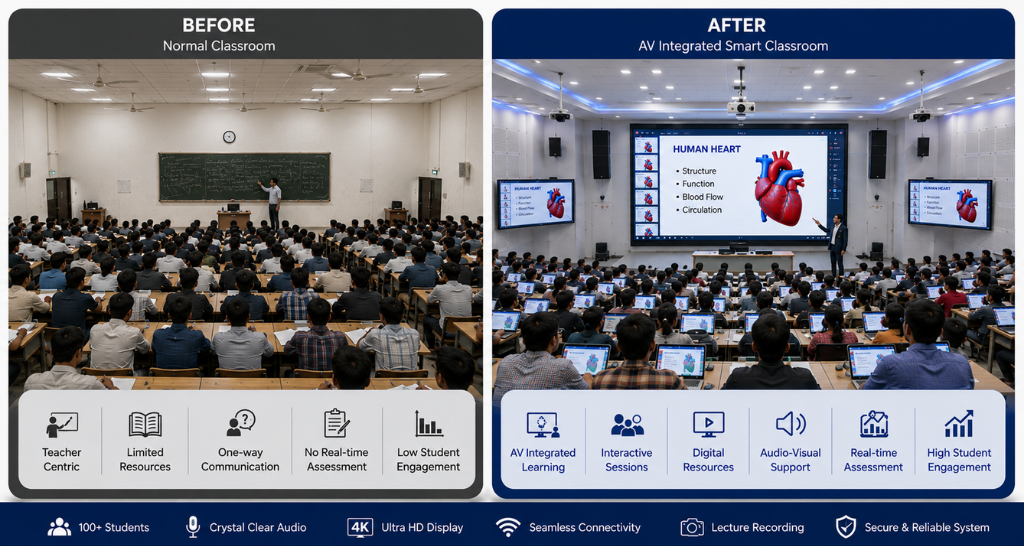
Beyond the Blackboard: How Audio Visual System Is Shaping the Smart Classroom?
Education is no longer limited to textbooks, blackboards, and one-way lectures. Classrooms are becoming connected learning environments where teachers can combine visuals, audio, digital content, interactive tools, and remote participation to create more engaging lessons. This transformation is being driven by the growing adoption of the Audio Visual System in schools, colleges, universities, training centres, and other educational institutions.
A smart classroom is not simply a room with a large screen. It is an integrated environment where displays, speakers, microphones, cameras, interactive technologies, content sources, and control systems work together. When properly planned, an Audio Visual System can make complex concepts easier to understand, support different learning styles, and improve communication between teachers and students.
From interactive lessons to hybrid classrooms, the role of AV technology continues to expand. Institutions are increasingly looking beyond individual devices and investing in complete solutions that can support their teaching objectives, infrastructure, and future technology requirements and Audio Visual System.
What Is an Audio Visual System in a Smart Classroom?
An Audio Visual System is a combination of technologies used to capture, process, display, distribute, and manage audio and visual information.
In an educational environment, this can include:
- Interactive displays
- Projectors and projection screens
- LED video walls
- Classroom speakers
- Wireless and wired microphones
- Cameras
- Document cameras
- Video conferencing systems
- Content-sharing systems
- Control panels
- Digital signage
- Networked AV equipment
The purpose is not simply to add more technology to the classroom. Instead, these components should work as a coordinated ecosystem.
For example, a teacher can display a presentation on a large screen, play an educational video through classroom speakers, share content from a laptop, and connect remote students through video conferencing all without switching between complicated systems.
This is where a well-designed Audio Visual System becomes valuable: it brings multiple classroom technologies together into an easier and more consistent teaching experience.
Why Smart Classrooms Need Better Audio Visual System
Traditional classrooms generally depend on verbal explanations, printed material, and static boards. These methods remain useful, but they may not always be sufficient for subjects that require visualisation, demonstrations, simulations, or real-time collaboration.
A properly designed Audio Visual System can address several of these challenges and Audio Visual System.
1. Makes Learning More Visual
Students can understand diagrams, processes, maps, animations, 3D models, and demonstrations more easily when information is presented visually.
Instead of explaining a complex engineering process verbally, a teacher can show an animated simulation. Similarly, medical students can view detailed anatomical content, while geography students can explore interactive maps.
Visual learning can make lessons more engaging while giving teachers additional ways to explain difficult concepts.
2. Improves Audio Clarity
A large classroom can create challenges for voice communication. Students sitting at the back may struggle to hear the teacher clearly, particularly when the room has poor acoustics.
A professional Audio Visual System can include strategically positioned speakers, microphones, digital signal processing, and acoustic considerations to distribute sound more evenly and Audio Visual System.
The objective is simple: students should hear the teacher and media content clearly without unnecessarily increasing volume.
3. Supports Interactive Teaching
Smart classrooms allow teachers to move beyond passive presentations.
Interactive displays can enable teachers and students to annotate diagrams, manipulate content, solve problems, highlight information, and interact directly with digital lessons.
This changes the classroom from a space where students simply watch content into one where they can participate in it.
4. Enables Hybrid Learning
Hybrid education has made video conferencing an increasingly important part of classroom infrastructure.
With the right Audio Visual System, remote students can participate in lectures while classroom cameras capture the teacher and relevant content. Microphones can capture classroom discussions, while speakers allow students to hear remote participants.
This creates a more connected learning environment for institutions managing both physical and remote learners.
Key Components of a Smart Classroom AV Setup
A successful smart classroom depends on selecting the right components rather than simply purchasing the latest equipment.
Interactive Displays
Interactive displays provide a central visual interface for lessons, presentations, digital whiteboarding, and collaboration.
Teachers can use them to annotate content, open educational applications, display videos, and interact with lesson material and Audio Visual System.
The display size should be selected according to classroom dimensions, viewing distance, seating arrangement, and expected content.
LED Video Walls
For larger classrooms, auditoriums, lecture theatres, and training environments, LED technology can provide a large and seamless visual surface.
An Indoor LED Display can deliver high-resolution visuals and is particularly useful when the audience is seated at different distances from the screen. Lightomated’s indoor LED solutions are designed for educational institutions and other controlled indoor environments, with options such as Vivid and Neo Series configurations.
This makes LED technology useful for:
- Large lecture halls
- University auditoriums
- Training centres
- Educational demonstration spaces
- Multipurpose classrooms
- Campus event areas
Classroom Audio
Audio quality is often overlooked during classroom technology planning.
A classroom audio solution can include ceiling speakers, wall-mounted speakers, wireless microphones, lapel microphones, handheld microphones, and digital signal processors.
Speaker placement should be carefully planned according to room geometry and seating positions. Simply increasing speaker volume is not a substitute for proper design.
Cameras
Cameras become particularly important in hybrid classrooms.
A camera can capture the instructor, students, demonstrations, or classroom activities. PTZ cameras can provide flexible positioning and remote control, while tracking technologies can help keep the instructor within the frame.
The appropriate camera configuration depends on room size, teaching style, and video conferencing requirements.
Video Conferencing
Video conferencing allows educational institutions to connect classrooms with remote students, guest lecturers, other campuses, and external experts.
It can also support cross-campus teaching and specialised lectures where the instructor is located elsewhere.
Control Systems
A classroom can contain numerous devices, and operating each one separately can become frustrating.
A central control interface can allow teachers or administrators to manage displays, audio, sources, cameras, lighting, and other connected equipment from a single interface.
This reduces operational complexity and helps users start lessons faster.
How AV Integration Connects the Classroom?
Individual AV devices are useful, but their real value appears when they work together.
For example:
Laptop → Presentation Source → AV Processor → Display → Audio System
At the same time:
Camera + Microphone → Video Conferencing Platform → Remote Participants
A professional Audio Visual System can connect these elements into one coordinated environment.
This approach is closely related to professional AV integration, where different technologies are designed and configured as a single solution rather than installed as disconnected products.
For institutions looking for professional AV Integration in Delhi, Vallect provides integrated solutions for educational institutions, including smart classrooms, virtual learning environments, interactive displays, and campus communication technologies.
A teacher may need to communicate with another campus, invite a guest speaker, share documents, or collaborate with students remotely. This is where Unified Communication and Collaboration technologies become valuable.
These solutions bring together video conferencing, audio conferencing, messaging, content sharing, and collaboration tools within a connected environment.
For example, a university could connect multiple classrooms across different cities and allow faculty members to conduct a shared lecture.
Instead of treating video conferencing as a separate technology, institutions can integrate it into the wider classroom infrastructure.
Benefits of an Integrated Classroom AV Solution:
A properly planned Audio Visual System can deliver benefits beyond better presentations.
Better Student Engagement
Multimedia content can make lessons more dynamic and help teachers explain concepts through a combination of text, images, sound, video, and interactive elements.
Improved Content Visibility
Large displays ensure that students at the back of a classroom can view presentations, diagrams, and videos more comfortably.
Flexible Teaching
Teachers can switch between presentations, videos, live demonstrations, digital whiteboards, and online resources according to the lesson.
Remote Collaboration
Students and faculty can connect with people outside the physical classroom, opening opportunities for guest lectures, international collaboration, and cross-campus teaching.
Consistent User Experience
A centralised control system can simplify operation and reduce the time teachers spend managing technology.
Scalability
Institutions can design classroom technology with future expansion in mind, allowing additional rooms, displays, cameras, or collaboration technologies to be integrated later.
Designing the Right Audio Visual System for a Classroom:
There is no universal AV setup that works for every educational space.
A 20-seat classroom has very different requirements from a 200-seat lecture hall.
Before selecting equipment, institutions should consider:
Room Size: Determines display size, speaker coverage, camera requirements, and cable infrastructure.
Viewing Distance: Influences display technology, resolution, and screen size.
Seating Layout: Determines camera angles, microphone placement, and sound distribution.
Acoustics: Hard surfaces can create reflections and reverberation, affecting speech intelligibility.
Lighting: Natural and artificial light can influence display visibility and camera performance.
Content Requirements: A classroom focused on presentations may need different technology from a laboratory or design studio.
Connectivity: Wired and wireless content-sharing options should be considered.
Future Expansion: Infrastructure should allow upgrades without requiring a complete redesign.
Audio Visual System vs Normal Classroom:
| Feature | Normal Classroom | Smart Classroom |
| Content | Books and boards | Digital + physical content |
| Visual Learning | Static | Multimedia and interactive |
| Audio | Basic speakers | Distributed professional audio |
| Remote Learning | Limited | Integrated video conferencing |
| Collaboration | Primarily in-person | In-person + remote |
| Content Sharing | Cables/manual setup | Wired/wireless options |
| Control | Multiple devices | Centralised control |
| Scalability | Limited | Designed for expansion |
The difference is not about replacing teachers or traditional teaching methods. Technology works best when it supports teachers rather than complicating their workflow.
Common Mistakes When Planning Classroom AV:
Even a high-quality Audio Visual System can underperform if the planning stage is overlooked.
Choosing Equipment Before Understanding the Room
Buying a display or speaker system first and figuring out installation later can create compatibility and performance problems.
Ignoring Acoustics
Good speakers cannot completely compensate for severe reverberation or poor room acoustics.
Installing an Oversized Display
A bigger screen is not automatically better. Display size should correspond to viewing distance and room layout.
Overcomplicating Controls
Teachers should not need technical expertise to start a class. Controls should be intuitive and clearly labelled.
Forgetting Maintenance
Dust, cable faults, software updates, component failures, and calibration issues can affect classroom performance over time.
A maintenance plan should therefore be part of the original solution rather than an afterthought.
How AV Technology Supports Different Learning Environments?
The flexibility of an Audio Visual System allows it to support different educational spaces.
Schools
Schools can use interactive displays, classroom audio, content-sharing systems, and digital learning tools to make lessons more engaging.
Colleges and Universities
Higher education institutions can deploy AV technology across lecture halls, classrooms, laboratories, seminar rooms, and auditoriums.
Training Centres
Training environments can benefit from large displays, wireless microphones, cameras, and content-sharing systems.
Lecture Theatres
Large lecture theatres require careful consideration of display visibility, sound coverage, camera positioning, and presenter control.
Multipurpose Rooms
Rooms used for lectures, workshops, examinations, events, and meetings require flexible AV infrastructure that can adapt to different activities.
Security, Networking, and Infrastructure
Modern classroom AV is increasingly dependent on network infrastructure.
Displays, cameras, control processors, conferencing systems, and content-sharing devices may all require network connectivity.
Therefore, institutions should consider network bandwidth, device management, cybersecurity, cable pathways, rack space, power requirements, and equipment access during the design phase.
This is especially important when deploying AV technology across an entire campus.
A classroom may work perfectly in isolation, but scaling the same solution across dozens of rooms requires standardisation and centralised management.
The Future of Smart Classrooms
The next generation of classrooms will become increasingly connected.
AI-assisted cameras may improve framing and tracking. Advanced microphones can improve speech capture. Wireless collaboration can reduce cable dependency. Large-format LED displays can create immersive teaching environments. Cloud-based platforms can connect classrooms across locations.
However, technology should always follow the learning objective.
The best Audio Visual System is not necessarily the one with the most devices. It is the one that makes teaching easier, improves communication, supports students, and remains reliable over time.
As educational institutions continue adopting hybrid learning, digital content, collaborative teaching, and connected campuses, integrated AV infrastructure will become an increasingly important part of classroom planning.
How Vallect Helps Build Smart Classroom AV Solutions
Vallect helps educational institutions design and implement integrated AV environments based on room size, teaching requirements, audience capacity, technology objectives, and future expansion plans.
Its education-focused AV capabilities include smart classrooms, virtual learning environments, interactive displays, video conferencing, and integrated classroom technologies.
From initial consultation and site assessment to installation, configuration, training, and support, the objective is to create a classroom where technology works naturally in the background while teachers remain focused on teaching.
For institutions planning a new smart classroom or upgrading an existing one, the right Audio Visual System can turn a conventional teaching space into a connected, interactive, and future-ready learning environment.