
 admin
August 24, 2026
admin
August 24, 2026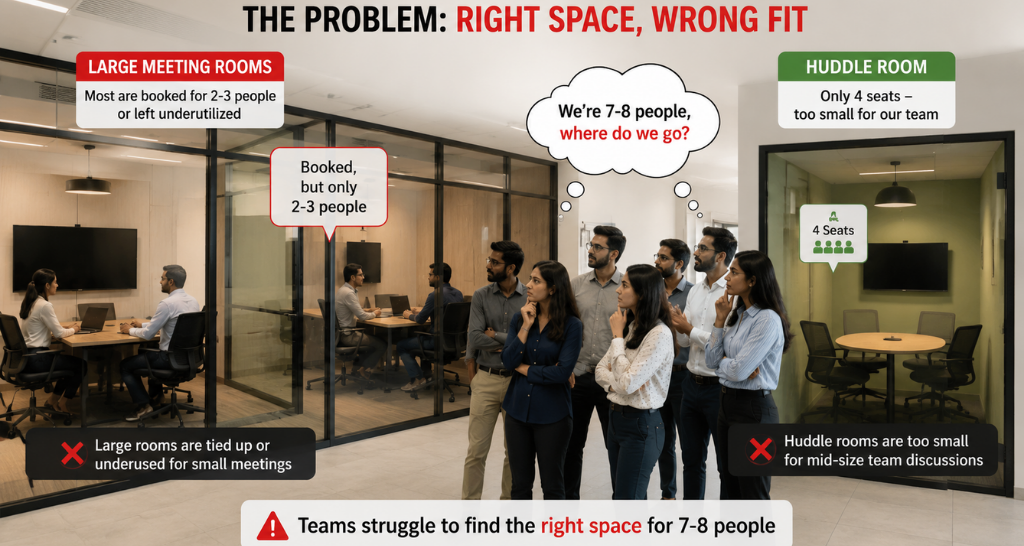
2 People, 12 Seats? How Smart Meeting Room Booking Optimize Spaces?
If two employees need a quick meeting, do they really need a 12-seat boardroom?
This is a common workplace problem that often goes unnoticed, Meeting Room.
A 12-seat boardroom booked by two or four employees may show as “occupied” in the booking system, but most of its capacity remains unused.
At the same time, a team of 10 employees may be unable to find a suitable Meeting Space because the larger room they actually need is already occupied by a much smaller group.
This is where a smart meeting room booking solution can improve space utilization and video conferencing system.
Instead of helping employees find just any available room, the system can help them identify the right-sized Meeting Space based on the number of participants and meeting requirements.
How Employee Count Affects Meeting Space Utilization?
Every meeting does not require the same type or size of room.
A two-person discussion may only require a small huddle room.
A meeting with four to six employees may need a medium-sized room.
A 10-person client meeting may genuinely require a large conference room or boardroom and Meeting Room.
When employees choose rooms only according to availability, larger spaces can easily become occupied by smaller groups and video conferencing.
For example:
2 employees → 12-seat boardroom
The room is technically being used, but 10 seats of available capacity are not required for that meeting and Meeting Room.
Now consider:
10 employees → Need a 10–12 seat room → Boardroom unavailable
The office may have enough overall Meeting Space, but it is not being allocated efficiently.
The problem, therefore, is not always a shortage of meeting rooms.
Sometimes, it is simply a mismatch between meeting size and room size.
How Smart Room Booking Matches People with the Right-Sized Room?
A smart meeting room solution can make participant count part of the room-selection process.
When an employee schedules a meeting for two people, the system can prioritize smaller available rooms instead of presenting a large boardroom as the first choice and Video Conferencing Solution for Board rooms
For a four-person meeting, it can recommend a four-to-six-seat room and Meeting Room.
For a larger team, it can prioritize conference rooms or boardrooms with enough capacity.
A typical allocation could look like this:
2 employees → 2–4 seat huddle room
4 employees → 4–6 seat meeting room
6–8 employees → 6–8 seat conference room
10–12 employees → 10–12 seat boardroom
These capacity ranges can be configured according to the organization’s room inventory and workplace policies and Meeting Room.
The important idea is that Meeting Space is allocated according to actual meeting demand rather than availability alone.
2 People in a 12-Seat Boardroom: What Changes with Smart Room Allocation?
Consider an office with three available rooms:
A four-seat huddle room.
A six-seat meeting room.
A 12-seat boardroom.
Two employees need a room at 11:00 AM.
Without intelligent room allocation, they may simply select the 12-seat boardroom because it is available, familiar, or has better video conferencing facilities.
A few minutes later, a team of 10 employees needs a Meeting Room.
The four-seat and six-seat rooms cannot accommodate them and video conferencing.
The only suitable boardroom is already occupied by two people.
Now apply capacity-based room allocation.
The booking system identifies that the first meeting has only two participants and recommends the four-seat huddle room.
The two employees book the smaller Meeting Room.
The 12-seat boardroom remains available.
When the 10-person meeting is scheduled, the system can recommend the boardroom.
The result is simple:
Same number of rooms.
Same office floor area.
Same two meetings.
Better Meeting Space utilization.
No additional room had to be created.
The organization simply used its existing space more intelligently.
Meeting Space Optimization Is About Right-Sizing, Not Just Booking :
A room booking solution should therefore do more than answer:
“Which rooms are free?”
A smarter question is:
“Which available room is the right size for this meeting?”
Participant count becomes an important input.
Room capacity becomes another and video conferencing.
The system can then help employees find the closest match.
This is particularly useful in offices with a combination of huddle rooms, small meeting rooms, medium conference rooms and large boardrooms.
Instead of allowing every meeting to compete for every room, different Meeting Room sizes can be directed toward spaces designed for them.
That is how room booking becomes part of Meeting Space optimization, rather than simply a digital reservation process.
Room Size Is Important, But Meeting Requirements Still Matter:
Employee count should not be the only factor considered.
Imagine four executives joining an important hybrid client meeting.
A four-seat huddle room may technically have enough seating, but it may not have the required camera, microphones, display or video conferencing capabilities.
In this case, a slightly larger room with the required AV technology may be the better choice and Integration with Unified Communication and Collaboration technology can further support employees who need to connect remote and in-room participants within the same meeting workflow.
Smart room selection can therefore consider:
Number of participants + room capacity + AV requirements + meeting type + availability
This helps organizations optimize physical space without compromising the actual meeting experience.
The objective is not to force every small group into the smallest possible room.
It is to find the most appropriate Meeting Space for that particular meeting.
From Room Booking to Better Space Utilization:
Meeting room optimization starts with a simple question:
How many people are actually meeting?
If two people need a room, a 12-seat boardroom should not automatically become their first option.
If four employees are meeting, a four-to-six-seat room may be more appropriate.
And when 10 or 12 people need to collaborate, the larger boardroom remains available for the purpose it was designed to serve.
Over hundreds of meetings, these small booking decisions can have a significant impact on how efficiently an office uses its available Meeting Space.
Smart room booking therefore isn’t about adding more rooms.
It is about making better use of the rooms you already have.
Right number of people. Right-sized room. Right technology. Better space utilization.
Smart Room Booking: With vs Without Meeting Space Optimization
The difference between basic room booking and smart Meeting Space management becomes clearer when we look at how the same office operates in both situations.
| Scenario | Without Smart Room Allocation | With Smart Room Allocation |
|---|---|---|
| 2-person meeting | Employees may book a 10–12 seat boardroom simply because it is available | System prioritizes a 2–4 seat huddle room |
| 4-person meeting | A large conference room may remain occupied by a small group | A 4–6 seat room is recommended based on participant count |
| 10-person meeting | Suitable boardroom may be unavailable because it is occupied by 2–4 people | Larger rooms remain available for meetings that need their capacity |
| Room Search | Employees manually check different available rooms | Suitable rooms can be filtered based on capacity and requirements |
| AV Requirements | Correct room size may be selected without checking available technology | Room selection can consider capacity along with video conferencing, display and collaboration requirements |
| No-Show Meeting | Reserved room may remain blocked despite nobody using it | Check-in and occupancy workflows can help release unused rooms |
| Space Utilization | Rooms are considered utilized simply because they are booked | Booking and occupancy data provide a clearer view of actual utilization |
| Workplace Planning | Decisions may be based largely on assumptions | Historical utilization data can support future room-size and workplace planning |
The difference is not about putting more meetings into fewer rooms.
It is about ensuring that a small meeting does not unnecessarily consume a Meeting Space designed for a much larger group.
How Vallect Helps Optimize Meeting Spaces
Effective Meeting Space optimization requires more than installing a room booking panel outside a conference room.
The booking platform, room scheduling displays, occupancy technology, video conferencing, AV systems, network infrastructure and workplace collaboration tools need to work together.
As an AV and technology system integrator, Vallect can help organizations design an integrated meeting-room environment around the way employees actually collaborate.
The process can begin by understanding the different meeting-room types within the workplace, their seating capacities and the technology available in each space.
A huddle room may require a compact display and collaboration system, while a large boardroom may require professional cameras, microphones, speakers, control systems and a dedicated Video Conferencing Solution for Board rooms.
Room scheduling and booking technology can then be integrated to help users identify an appropriate room based on availability, capacity and required facilities.
For offices with larger visual requirements, professional displays or indoor led displays can also become part of the overall room design depending on viewing distance, room dimensions and application.
The objective is to create an environment where room size, AV capabilities and booking technology complement one another.
Rather than treating room booking, AV and video conferencing as separate systems, Vallect can approach them as connected components of the workplace collaboration environment.
For organizations looking for TOP AV Integration in Delhi, this integrated approach can help ensure that the technology deployed in each room reflects its actual capacity and intended use.