
 admin
August 25, 2026
admin
August 25, 2026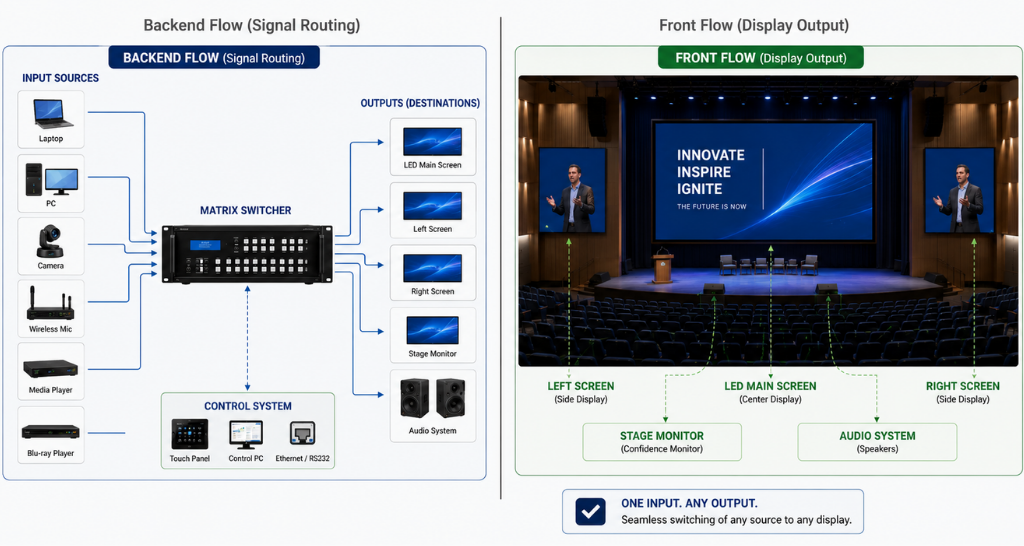
How Matrix Switching Helps Manage Multiple Displays in Auditoriums?
An auditorium may have one large screen on the stage, but that is rarely the only display that needs content.
A modern auditorium can include a main LED video wall, side screens, confidence monitors, green room displays, backstage monitors, control room screens and displays installed in the lobby or foyer and matrix switching.
The challenge is that all these screens may not need to show the same content at the same time.
During a presentation, the main screen may need the speaker’s slides while a green room display shows the live program feed.
During a panel discussion, the main screen may switch to a PTZ camera feed while a confidence monitor continues showing presentation content.
This is where Matrix Switching becomes an important part of Auditorium AV design.
It provides a structured way to route different video sources to different displays according to the requirements of the event.
Why Managing Multiple Auditorium Displays Gets Complex
Think about the number of video sources that can exist inside a modern auditorium.
There may be a presentation laptop, podium PC, media player, PTZ cameras, video conferencing system and other event or production sources.
Now consider the number of destinations and matrix switching.
The same Auditorium AV system may need to deliver content to the main stage screen, side displays, backstage monitors, green room, confidence monitors and foyer screens.
Connecting one laptop to one display is straightforward.
Managing multiple sources across multiple destinations is where the system becomes more complex.
A fixed point-to-point connection limits flexibility because one source is physically connected to a particular destination.
Matrix Switching provides greater routing flexibility by allowing compatible input sources to be directed to selected outputs through a centralized switching architecture.
The AV operator can therefore manage where each source needs to appear without repeatedly changing physical connections.
Where Are Different Displays Used in an Auditorium?
Understanding Matrix Switching first requires understanding how many different display locations can exist within an auditorium.
Each screen has a different purpose and may require a different video feed and matrix switching.
Main Stage LED Video Wall or Projection Screen
The main stage screen is the primary audience-facing display.
Depending on the auditorium design, it may use a large LED video wall or projection system.
It can display presentations, videos, event branding, speaker content, live camera feeds and other event visuals.
Professional indoor led displays are increasingly considered for auditoriums where high brightness, large screen size, seamless visuals or specific viewing requirements make LED appropriate.
The main display becomes one of the most important outputs within the overall Auditorium AV signal architecture.
Side Displays and Repeater Screens
Large auditoriums may use additional screens on either side of the stage.
These screens can improve visibility for people seated at angles or farther away from the main display.
They may show the same presentation as the main screen or switch to live camera content depending on the event.
With Matrix Switching, the system can route one source to the main and side screens together or provide different feeds where the system design requires it.
Confidence Monitors
Confidence monitors are positioned for speakers, presenters or performers rather than the audience.
A presenter may need to see the presentation, program feed or other reference content while facing the audience.
This creates another display destination within the Auditorium AV system.
The content on a confidence monitor does not always need to match what the audience sees on the main screen.
That makes flexible signal routing important.
Green Room Displays
The green room is often overlooked when people think about auditorium displays.
Speakers, performers and guests may wait here before entering the stage.
A display in the green room can show the live program feed, ongoing session, stage activity or other relevant event information.
This allows the next speaker or performer to understand what is happening inside the auditorium without being physically present in the main hall.
Matrix Switching can help route the required program or camera feed to this display while the audience-facing screens continue showing different content.
Backstage and Technical Area Monitors
The backstage team may also need visual monitoring.
Depending on the event workflow, backstage displays can show stage activity, program output, presentation feeds or other technical monitoring sources.
This becomes especially useful for coordinated events involving multiple speakers, performances or technical teams.
A well-designed Auditorium AV system considers these backstage requirements during the initial signal-flow planning rather than treating them as an afterthought.
Control Room and AV Operator Displays
The control room is where AV operators monitor and manage the event.
An operator may need visibility of multiple sources such as the presentation laptop, PTZ cameras, media playback and final program output.
For example:
Monitor 1 → Presentation source
Monitor 2 → PTZ camera feed
Monitor 3 → Program output
Monitor 4 → Main display feed
The exact monitoring architecture depends on the production and control system being used.
Matrix Switching can form part of the wider routing infrastructure that sends required signals to operator monitoring destinations.
Lobby and Foyer Displays
Displays outside the auditorium can extend the event experience beyond the main hall.
Foyer screens may show event branding, schedules, announcements, sponsor content or a live program feed.
If the system needs to distribute a live auditorium source to these screens, the lobby becomes another destination that must be considered in the Auditorium AV signal design.
Why Every Auditorium Display Does Not Need the Same Content
This is the main reason centralized video routing becomes valuable.
Suppose an auditorium has seven display destinations.
Showing the same source on all seven screens would be relatively simple.
Real events rarely work that way.
During a keynote presentation:
Main LED Wall → Presentation
Side Displays → Presentation
Confidence Monitor → Presenter reference feed
Green Room → Live program feed
Backstage → Stage/program feed
Lobby → Event branding or live feed
Control Room → Multiple source monitoring
Now the requirement is not simply video distribution.
The system needs intelligent routing.
Matrix Switching makes it possible to select which compatible source is sent to which destination, according to the designed system capabilities.
How Matrix Switching Routes Content Across Auditorium Displays
A matrix switcher works around inputs and outputs.
Inputs are the sources entering the system.
Outputs are the destinations receiving those signals.
For example, inputs may include a podium PC, presenter laptop, media player and selected video feeds.
Outputs may include the main LED wall, side displays, green room, backstage monitor and foyer display.
Matrix Switching allows the required input-to-output paths to be created without physically reconnecting every source each time the event requirement changes.
One Source to Multiple Displays
Sometimes the same presentation needs to appear in several locations.
A laptop presentation, for example, may need to reach the main LED wall and two side displays simultaneously.
The routing requirement becomes:
Presentation Laptop → Main LED Wall + Left Display + Right Display
This is a common requirement within Auditorium AV environments.
Different Sources on Different Displays
Now consider a more complex event.
The audience needs to see a presentation.
The green room needs a live program feed.
The foyer needs branding content.
The system may therefore require:
Presentation Source → Main Display
Program Feed → Green Room
Media Player → Foyer Display
This ability to manage different routing paths is one of the key reasons Matrix Switching is used in multi-display environments.
Changing Display Feeds During an Event
Display requirements can also change during the event.
During the presentation, the main screen may show slides.
When the session moves to a panel discussion, the required main-screen source may change to a camera or production program feed.
During a break, branding or scheduled media content may need to appear.
The AV team can change the routing according to the event workflow without physically changing source-to-display cabling.
A Real-World Matrix Switching Scenario
Consider an auditorium with the following sources:
- Presenter laptop
- Podium PC
- Media player
- Three PTZ cameras
- Production/program feed
The auditorium has:
- Main LED video wall
- Two side displays
- Two confidence monitors
- Green room display
- Backstage monitor
- Foyer display
During a corporate presentation, the presenter laptop may be routed to the main screen and side displays.
The green room can continue receiving the program feed.
During a panel session, the main display may switch to the selected program feed while presentation content remains available on an appropriate confidence display where required.
During the break, the media player can provide branding content to selected audience-facing or foyer screens.
Matrix Switching allows the routing infrastructure to support these changing requirements.
This is why routing architecture should be considered early when designing Auditorium AV, especially where the venue supports different event formats.
Auditorium Display Management: With vs Without Matrix Switching :
| Without Centralized Matrix Routing | With Matrix Switching |
|---|---|
| Video connections can rely heavily on fixed source-to-display paths | Sources can be routed to selected compatible outputs |
| Changing routes may require more manual intervention | Routing can be changed electronically |
| Multi-display management becomes more complex as endpoints increase | Multiple destinations can be managed through centralized routing |
| One source may be tied to a specific display path | Available sources can be assigned according to event requirements |
| Expansion may require additional redesign or hardware | Matrix capacity can be planned with future expansion in mind |
| Event transitions can involve more operational steps | Preset routing can simplify common event scenarios when integrated with control |
| Difficult to create flexible source-destination combinations | Different displays can receive different required sources |
The value of Matrix Switching therefore becomes more noticeable as the number of sources, displays and event scenarios increases.
Matrix Switching with LED Walls, Projectors and Professional Displays:
An auditorium can use different display technologies within the same venue.
The main stage may use an LED video wall.
Other areas may use professional flat-panel displays or projection systems.
The routing system needs to deliver the appropriate signal to these display destinations while maintaining compatibility with the wider Auditorium AV architecture.
It is important to distinguish routing from display processing.
A matrix switcher routes signals.
An LED processor, scaler or display controller may perform additional processing required by the destination display.
This distinction becomes important when designing larger integrated systems.
Organizations evaluating Auditorium AV Solutions should therefore consider the entire video chain rather than selecting a matrix switcher or display independently.
Integrating PTZ Cameras and Live Event Feeds
Modern auditoriums frequently include PTZ cameras for event capture, streaming, recording and image magnification.
Camera signals may ultimately need to reach production equipment, recording systems, streaming infrastructure or auditorium displays.
The routing architecture must therefore account for both presentation sources and live video sources.
This is another area where Matrix Switching can form part of the broader Auditorium AV signal workflow.
However, a matrix switcher should not be confused with a production video switcher.
Matrix Switcher vs Production Video Switcher
The two devices solve different problems.
A matrix switcher primarily handles signal routing between multiple inputs and outputs.
A production video switcher is designed to create a live program output and may support cuts, transitions, layouts, graphics or other live-production functions depending on the system.
For example, a production switcher may select between PTZ cameras and presentation sources to create the final program feed.
Matrix Switching can then be used within the wider signal architecture to route required signals or outputs to appropriate destinations.
In a professionally designed Auditorium AV system, these technologies can complement each other rather than replace each other.
Centralized Auditorium AV Control and Matrix Switching
Routing becomes even easier for operators when it is integrated with a centralized control system.
Instead of remembering multiple individual routing steps, common event configurations can be programmed as control presets where appropriate.
For example:
Presentation Mode
Presenter source → Main + side displays
Required reference feed → Confidence monitors
Program feed → Green room
Panel Discussion Mode
Program output → Main + side displays
Required monitoring feeds → Technical destinations
Break Mode
Media source → Selected audience and foyer displays
This approach can reduce operational complexity, particularly in venues that host different events throughout the week.
Organizations looking for TOP AV Integration in Delhi can consider matrix routing as part of the complete signal, control, display and audio architecture rather than treating it as a standalone device.
How to Select the Right Matrix Switcher for an Auditorium
Choosing a matrix switcher starts with understanding the complete system.
Number of Inputs and Outputs
Count both current and expected future sources and destinations.
An 8×8 configuration may be sufficient for one project, while another auditorium may require a significantly larger architecture.
Future expansion should be considered during the initial design.
Resolution and Signal Compatibility
The routing infrastructure should support the resolutions and signal formats required by the connected sources and destinations.
EDID, HDCP and scaling requirements may also need to be considered depending on the selected equipment.
Connectivity and Signal Distance
HDMI, SDI, HDBaseT and other transport technologies may be used depending on the design, source type and distance.
The correct choice depends on the wider Auditorium AV architecture.
Control Integration
A matrix that integrates with the auditorium control system can simplify day-to-day operation.
Instead of exposing complex technical routing to every user, common functions can be presented through an operator-friendly control interface.
Future Scalability
An auditorium may start with one main display and a few auxiliary screens but expand later.
Planning additional input and output capacity can make future upgrades easier.
Matrix Switching vs AV-over-IP for Large Auditoriums
Traditional matrix-based routing is not the only approach available today.
Larger or highly distributed environments may also use AV-over-IP.
A hardware matrix can be suitable where endpoints are relatively defined and centralized.
AV-over-IP can offer greater flexibility and scalability by distributing AV signals across a suitable network architecture.
The right choice depends on factors such as endpoint count, physical distances, scalability, network design, latency requirements, redundancy and budget.
For venues that also require Unified Communication and Collaboration, streaming or network-based collaboration, the broader technology architecture should be evaluated rather than selecting a routing approach in isolation.
Similarly, technologies designed for spaces such as a Video Conferencing Solution for Board rooms solve different collaboration requirements and should be integrated according to the actual use case.
How Vallect Helps Design Integrated Auditorium Display Systems
Successful Matrix Switching starts with signal-flow planning, not simply choosing a switcher with enough ports.
Vallect approaches auditorium integration by first understanding the venue layout, event formats, number of sources, display locations and operator workflows.
The design can account for the main stage display, side screens, confidence monitors, green room, backstage, control room and foyer requirements.
The wider Auditorium AV scope can then bring together displays, professional audio, microphones, PTZ cameras, video processing, routing, control, streaming and supporting AV infrastructure.
This integrated approach helps ensure that every display receives the required content without making operation unnecessarily complicated for the technical team.
For venues that host presentations, conferences, cultural events, panel discussions and live productions, flexible routing also allows the same auditorium infrastructure to support multiple event formats.
Ultimately, Matrix Switching is not about adding another piece of hardware to an AV rack.
It is about ensuring that the right video source reaches the right screen at the right time.