
 admin
August 27, 2026
admin
August 27, 2026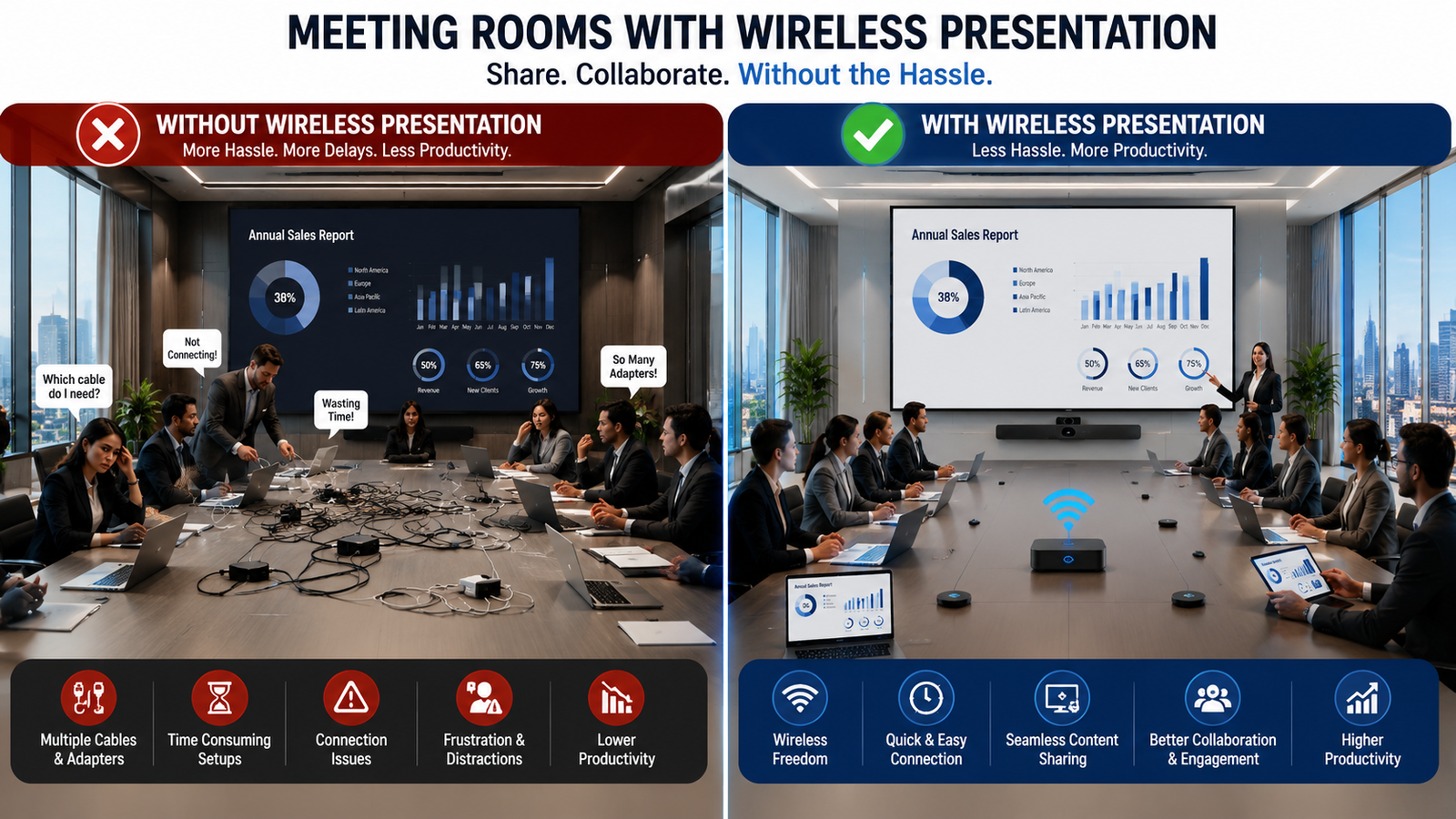
No Cables, No Delays: Simplifying Meeting Rooms with Wireless Presentation
The meeting is scheduled for 10:00 AM.
Everyone is in the room, the presentation is ready, and the main display is on.
But the meeting still cannot start.
The HDMI cable does not fit the presenter’s laptop.
Someone starts looking for a USB-C adapter.
A colleague finally finds one, the presentation begins, and ten minutes later another team member wants to show a dashboard from a different laptop.
The cable changes hands again.
It is a small problem, but when it happens across multiple meeting rooms every day, the interruptions add up.
This is exactly where Wireless presentation for Meeting rooms changes the experience.
Instead of designing a meeting around cables, adapters, ports, and input switching, users can connect their own devices and put content on the room display with fewer physical steps.
The objective is not simply to remove HDMI cables.
It is to make sharing content so straightforward that the technology stays in the background while the conversation remains the focus.
Why Does Screen Sharing Still Slow Down Meetings?
Modern offices may have high-resolution displays, video conferencing cameras, advanced microphones, and room control systems.
Yet something as basic as displaying a presentation can still become an unnecessary interruption.
One reason is the variety of devices employees use.
One person may carry a Windows laptop with HDMI.
Another may use a MacBook with USB-C.
A visitor might arrive with a tablet.
Even when the meeting room provides several connectivity options, users still need to understand which cable, adapter, or input they should select.
Physical connections also create another problem when several people need to present.
Imagine a project review involving the sales, design, finance, and management teams.
The sales team starts with a presentation.
Design then needs to show a drawing.
Finance wants to open a spreadsheet.
Management finally wants to review a live dashboard.
Traditional connectivity can turn every change of presenter into another round of plugging, unplugging, and selecting inputs.
Wireless presentation for meeting rooms is designed to reduce this friction by making content sharing less dependent on physical connections and supporting seamless Audio Visual Integration.
What Does a Cable-Free Meeting Room Actually Look Like?
A cable-free experience should feel simple from the user’s perspective.
A person enters the room with their laptop, connects to the available presentation system, selects the meeting room display, and starts sharing.
There is no need to move closer to the display because the HDMI cable is short.
There is no need to sit in a particular chair because that is where the table connectivity box is located.
Most importantly, presenters can remain where they are comfortable while controlling their own content.
That is the practical value of Wireless presentation for Meeting rooms.
It changes the experience from:
Find cable → check port → find adapter → connect → select input → present
to:
Connect → share → present
The exact connection process varies between wireless presentation platforms, but the goal remains the same: reduce the number of technical steps users face before content reaches the display.
How Does Wireless Presentation Work in a Meeting Room?
Although the experience should feel simple, several technologies may be working behind the scenes.
A typical setup includes a user device, wireless presentation platform or receiver, network connectivity, and the main meeting room display.
The basic content path looks like this:
Laptop / Tablet / Smartphone → Wireless Presentation System → Meeting Room Display
Depending on the selected solution, a user may connect through an application, browser, native screen-sharing protocol, dedicated wireless button, or another supported method.
The presentation system receives the content and sends it to the room display or AV system.
In larger integrated spaces, Wireless presentation for Meeting rooms may also work alongside video processors, switchers, control processors, conferencing systems, and multiple displays.
This is why wireless presentation should not be considered an isolated device.
It needs to fit into the complete AV and network design of the room, supporting seamless Unified Communication and Collaboration.
One Meeting, Multiple Presenters Without Passing the Cable
The real advantage becomes clearer when a meeting involves several presenters.
Consider a quarterly business review.
The marketing team starts by presenting campaign results.
A few minutes later, the sales manager wants to show regional performance.
Finance then needs to compare the numbers against the budget.
With a traditional setup, every transition may require another device to be physically connected.
With Wireless presentation for Meeting rooms, supported users can connect their devices to the presentation environment and switch content with fewer physical interruptions.
Video Conferencing Solutions for Boardrooms make meetings more conversational, enabling clear communication, seamless collaboration, and better engagement for every participant.
Someone can say, “I have the latest numbers,” and move towards sharing them instead of asking, “Can you pass me the HDMI cable?”
That small difference matters in collaborative spaces where meetings are meant to involve discussion rather than one person presenting for an hour.
What Happens When Someone Brings a Different Device?
Meeting rooms are no longer designed around one standard company laptop.
BYOD, or Bring Your Own Device, has changed how employees and visitors use collaboration spaces.
A single meeting may include Windows laptops, MacBooks, tablets, and smartphones.
The challenge is making these different devices work with the same room and Meeting Room AV Solutions
A well-designed Wireless presentation for Meeting rooms setup can reduce dependence on the physical ports available on each device.
However, this does not mean every wireless system supports every device or operating system in exactly the same way.
Compatibility should therefore be checked during system selection.
Organizations should understand which devices employees commonly use, whether mobile sharing is required, and whether users can install applications on company-managed laptops.
The simpler the connection process is across the organization’s actual device ecosystem, the more useful the system becomes.
What If a Client or Guest Wants to Present?
Internal employees usually become familiar with their meeting room technology.
Guests do not have that advantage.
A client, consultant, vendor, or external partner may walk into the room for the first time and need to present within minutes.
They should not need an explanation of the complete AV system just to put a slide deck on the screen.
This is another important use case for Wireless presentation for Meeting rooms.
Guest workflows should be considered while designing the system, including how users connect, whether software installation is required, and what network access they receive.
At the same time, convenience should not override security.
The system should follow the organization’s IT policies and provide an appropriate method of separating guest connectivity from sensitive corporate resources where required and indoor led display.
A good guest experience is therefore not simply “open access.”
It is easy access designed within the company’s security requirements.
Can Multiple People Share Their Screens at the Same Time?
Wireless presentation can go beyond replacing one HDMI connection.
Some platforms support multiple connected users or simultaneous content views.
That can change how teams use the main display.
Imagine an architect comparing two design options side by side.
A sales team could view a presentation alongside a live dashboard.
Finance could compare current numbers with a previous report.
A project team could keep a timeline visible while reviewing supporting documents.
Where the selected system supports these capabilities, Wireless presentation for Meeting rooms can turn the display from a single-presenter screen into a more collaborative workspace.
However, the number of simultaneous sources, layouts, resolutions, and control options varies by platform.
These requirements should be defined before choosing the system rather than assumed after installation.
Wireless Presentation in Hybrid Meetings
Content sharing becomes more complex when some participants are sitting in the room and others are joining remotely.
A local participant may want the presentation to appear on the meeting room display while also being visible to people connected through the video conferencing platform.
This requires the wireless presentation workflow to work properly with the wider collaboration setup.
A modern meeting room may include:
Wireless Presentation + Display + Camera + Microphones + Speakers + Video Conferencing Platform
In these environments, Wireless presentation for Meeting rooms should be considered as one part of the complete meeting experience.
The system design needs to define how local content enters a Teams, Zoom, Webex, or other conferencing session.
This is especially important because displaying content locally and sharing it with remote participants are not always the same technical process.
Users, however, should not have to think about that complexity every time they meet.
The integration should make the workflow clear and repeatable.
Will Wireless Presentation Cause Lag or Affect Video Quality?
Going wireless does not automatically guarantee a smooth presentation.
The experience depends on how the system is designed and what type of content users need to share.
A PowerPoint presentation with mostly static slides has different performance requirements from a 4K promotional video.
Network quality, Wi-Fi congestion, available bandwidth, device performance, resolution, frame rate, and the wireless presentation platform itself can all influence performance.
This is why Wireless presentation for Meeting rooms should be planned around actual room usage.
If a room is primarily used for presentations, documents, and dashboards, the requirements may be different from a creative review room where teams regularly play high-resolution video.
Latency also matters.
A noticeable delay between an action on the laptop and the result appearing on the main display can make demonstrations and interactive presentations uncomfortable.
Testing expected content types is therefore an important part of deployment.
Is Wireless Presentation Secure for Corporate Meeting Rooms?
Convenience is only one side of the design.
IT teams also need to know how content moves between a user’s device and the presentation system.
The exact security capabilities depend on the selected platform, but organizations may need to evaluate encryption, authentication, network segmentation, guest access, device permissions, firmware management, and administrative controls.
Wireless presentation for Meeting rooms should therefore be selected with both AV and IT requirements in mind.
A solution that is easy for users but does not fit corporate security policies can create another problem.
Similarly, a highly restricted system that takes several minutes to connect may defeat the purpose of simplifying meetings.
The goal is to find the right balance between user convenience and organizational control.
Wired vs Wireless Presentation: What Actually Changes?
The difference is easiest to understand from the user’s point of view.
| Meeting Task | Cable-Based Presentation | Wireless Presentation |
|---|---|---|
| Starting a presentation | Connect a physical cable | Connect wirelessly |
| Different laptop ports | Adapter may be required | Reduced port dependency |
| Changing presenters | Disconnect and reconnect devices | Digital switching where supported |
| Presenting from different seats | Limited by cable location | Greater flexibility |
| Guest presentation | Physical compatibility matters | Easier BYOD workflow |
| Meeting table | More visible connectivity | Cleaner setup |
| Multiple presenters | Repeated physical switching | Smoother collaboration |
| Mobile devices | Additional adapters may be required | Supported devices can connect wirelessly |
For organizations with frequent collaborative meetings, Wireless presentation for Meeting rooms can therefore solve more than cable clutter.
Its bigger contribution is reducing the small interruptions that repeatedly break the flow of a discussion.
Should Meeting Rooms Become 100% Wireless?
Not necessarily.
Removing every physical connection may sound like the natural next step, but meeting rooms should be designed around reliability and user requirements rather than around the idea of being completely wireless.
A hybrid approach can work well.
Wireless presentation for Meeting rooms can serve as the primary content-sharing method, while HDMI or USB-C connectivity remains available as a backup.
This can be useful when a device cannot connect wirelessly, a visitor has unusual security restrictions, the network is temporarily unavailable, or specific high-bandwidth content performs better through a physical connection.
The objective should not be “no cables at any cost.”
It should be making wireless sharing the easiest everyday option while keeping appropriate fallback connectivity where the room requires it.
What Should You Check Before Choosing a Wireless Presentation Solution?
Buying a wireless presentation device without considering the wider meeting environment can create compatibility and performance problems later.
Before selecting Wireless presentation for Meeting rooms, businesses should evaluate several practical factors.
First, identify the devices people actually bring into the room.
Check operating systems, company laptop restrictions, mobile devices, and guest requirements.
Next, understand the content.
Are users mainly presenting slides and spreadsheets, or do they regularly share high-resolution video and interactive applications?
Then look at the room infrastructure.
Display resolution, network availability, Wi-Fi performance, video conferencing platforms, AV switchers, control systems, and room layouts can all influence the design.
Security requirements should also be established with the IT team before deployment.
Finally, think about consistency.
If users move between ten meeting rooms in the same office, completely different presentation workflows in every room can create confusion.
A standardized Wireless presentation for Meeting rooms experience can make it easier for employees to enter different spaces and already understand how to share.
Where Does Wireless Presentation Make the Biggest Difference?
Not every collaboration space operates in the same way.
A small huddle room may have four people rapidly exchanging ideas.
A conference room may host department reviews with several presenters.
A boardroom may combine local presentations with senior executives and remote participants.
A client meeting room may regularly accommodate external devices.
Wireless presentation for Meeting rooms is particularly useful in spaces where content frequently moves between different users and devices.
The more collaborative the meeting, the more noticeable the reduction in physical switching can become.
It also supports cleaner meeting tables because fewer presentation cables need to remain permanently accessible.
For architects and AV designers, this can help create rooms where the technology is present without dominating the furniture and interior design.
The Best Meeting Room Technology Is the Technology You Don’t Have to Think About
Go back to that 10:00 AM meeting.
The real problem was never the HDMI cable itself.
The problem was that everyone was ready to discuss the work, but the technology demanded attention first.
A well-planned Wireless presentation for Meeting rooms setup reverses that relationship.
The technology becomes a background service rather than an activity users have to manage.
People enter.
They connect.
They share.
The discussion begins.
That is ultimately what a modern meeting room should deliver.
Not simply fewer cables, but fewer barriers between an idea on someone’s device and the conversation happening around the table.
How Vallect Helps Build Smarter Wireless Meeting Rooms
Wireless presentation works best when it is not treated as a standalone device.
Vallect designs and integrates complete meeting room AV solutions where Wireless presentation for Meeting rooms can work alongside professional displays, video conferencing systems, cameras, microphones, speakers, room control, and network infrastructure.
Based on the room size, number of users, BYOD requirements, conferencing platform, security needs, and existing AV setup, the system can be designed around the actual way teams meet and collaborate.
From boardrooms and conference rooms to smaller huddle spaces, Vallect focuses on creating a consistent meeting experience where users can enter the room, connect their device, share content, and start the discussion with fewer technical interruptions.
The objective is simple: make the technology work together so users do not have to think about what is happening behind the screen.