
 admin
September 22, 2026
admin
September 22, 2026
Turning Passive Audiences into Active Participants with Auditorium AV
An auditorium is more than a large room with seats, speakers and a screen. Whether it is used for lectures, conferences, corporate events or performances, the quality of communication directly affects how the audience experiences the event. Clear sound and a large screen are important, but they are not always enough to keep people attentive and involved withAuditorium AV.
A professionally planned auditorium AV system can help create a more interactive experience by combining audio, visual, control, camera and connectivity technologies. The objective is to make it easier for audiences to see, hear, understand and participate throughout an event.
What Makes an Auditorium Audience Passive?
| Auditorium Challenge | Impact on Audience Participation |
|---|---|
| Poor Visibility | A screen that is too small, incorrectly positioned, or affected by ambient lighting can make presentations difficult to follow, especially for people sitting farther away. |
| Unclear Audio | Uneven speaker coverage, background noise, or poorly positioned microphones can make speech difficult to understand and reduce the impact of the presentation. |
| Long Presentations Without Interaction | Long sessions with limited opportunities for questions or participation can make audiences passive and reduce active engagement with the content. |
| Remote Participants Not Properly Integrated | Poor camera framing, weak connectivity, or unclear two-way audio can make remote participants feel disconnected during hybrid events. |
How Can Auditorium AV Improve Audience Engagement?
A well designed auditorium AV system does more than deliver sound and visuals. It helps the audience see, hear and participate in an event without technical distractions. From clear audio across the seating area to live interaction and hybrid participation, each AV component contributes to how easily attendees can follow and engage with the event.

Clear Audio Throughout the Seating Area
Audio needs to remain clear across the entire auditorium, not just near the stage. A properly designed sound system distributes speech, presentations, videos and other content evenly across different seating areas.
Speaker placement, room dimensions, seating arrangement and acoustic conditions are considered while designing the system. This helps reduce situations where people in the rear or side sections struggle to hear the presenter.
| Audio Element | How It Supports Audience Engagement |
|---|---|
| Distributed speakers | Helps maintain consistent sound levels across different seating areas. |
| Wireless microphones | Allows presenters and speakers to move freely while maintaining clear speech. |
| Acoustic planning | Helps reduce unwanted echoes and sound reflections that can affect speech clarity. |
Large, High Visibility Displays
Audiences should be able to view presentation slides, videos, graphics and live content clearly from different positions. Large-format display solutions such as LED video walls, projection systems and large screens can provide the required visibility.
The display technology is selected based on auditorium size, viewing distance, content type and seating arrangement. This ensures that visual information remains easy to follow even for attendees seated farther from the stage.
Smooth Presentation Switching
Events often involve multiple content sources, including presenter laptops, cameras, document cameras and video playback systems. Switching between these sources manually can create unnecessary delays during a presentation.
An integrated presentation system allows operators to switch between connected sources smoothly. This helps keep the event moving while reducing interruptions between speakers, presentations and other content.
Microphones for Audience Interaction
Audience participation often involves questions, panel discussions and live conversations. Dedicated wireless or audience microphones allow attendees to speak without having to move toward a fixed microphone.
The microphone system can be planned according to the auditorium layout and the type of events being conducted. This makes audience interaction easier while allowing the presenter and other attendees to hear the discussion clearly.
| Audience Interaction | AV Support |
|---|---|
| Audience questions | Wireless or dedicated audience microphones can capture questions clearly. |
| Panel discussions | Multiple microphones can support several speakers during discussions. |
| Live participation | Microphone access allows attendees to contribute without interrupting the event flow. |
Live Q&A, Polling and Interactive Content
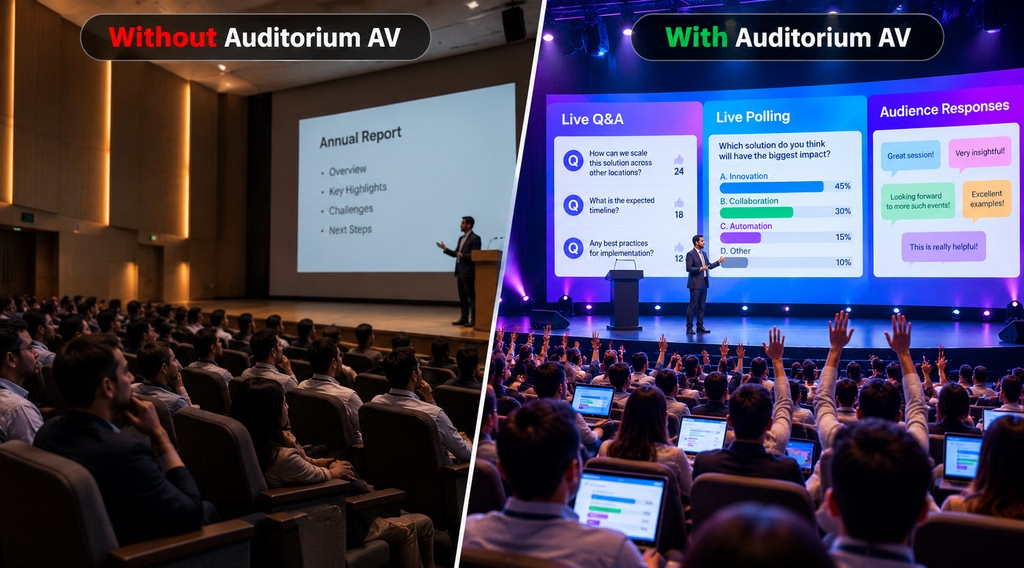
Auditorium AV systems can also support interactive content instead of limiting attendees to passive viewing. Live Q&A, polling and audience-response tools can allow participants to submit questions, respond to questions or provide feedback during an event.
These tools can be particularly useful for conferences, seminars, educational sessions and corporate events where audience participation is an important part of the session.
Cameras for Hybrid Events
For hybrid events, cameras extend audience participation beyond the physical auditorium. Cameras can capture presenters, panel discussions, speakers and selected audience interactions and share them with remote participants.
Camera placement and framing should be planned according to the stage, seating layout and event format. When integrated with microphones, displays and conferencing equipment, the system can create a more connected experience for both in-person and remote attendees.
Explore Some of Our Auditorium AV Projects


Plan an Auditorium AV System Around Your Audience?
A well-designed auditorium AV system brings audio, displays, cameras, presentation sources and control systems together to create a clear and interactive experience for every audience member. From lectures and conferences to corporate events and live performances, the right AV setup can be planned around your seating layout, viewing distance, acoustics and event requirements in Auditorium AV.
Talk to Vallect for AV consultation, system design, integration, installation, testing and ongoing support.
Email: info@vallect.com
Call: +91 73034 35333