
 admin
September 1, 2026
admin
September 1, 2026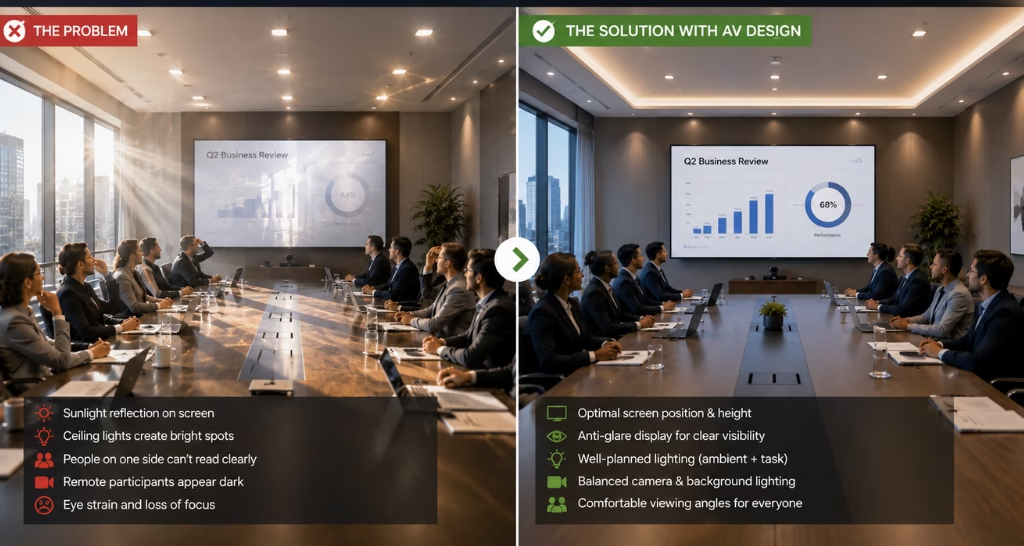
Boardroom Screen Glare: How the Right AV Design Solves It?
The board meeting is about to begin, 12 people are seated around the table, the presentation is ready, and the main display is on. but as the first slide appears, a few people on one side of the room struggle to read it clearly and AV Design.
Sunlight from the windows reflects directly on the screen. ceiling lights create bright spots, making certain parts of the presentation difficult to see. the meeting continues, but people keep adjusting their seats and changing their viewing angles. someone suggests increasing the screen brightness and put the Blackout Blinds down. It helps but only temporarily.
The real issue is not the presentation. It is how the display, lighting, windows, and viewing angles work together. This is where the right AV design helps create a clear and comfortable boardroom experience. professional AV Integration coordinates displays, lighting, room controls, and window treatments to improve screen visibility from every seat.
What Causes Screen Glare in Boardrooms?
Screen glare occurs when sunlight or artificial light reflects from the display surface toward viewers. large windows, glass partitions, ceiling lights, glossy tables, polished walls, and reflective display surfaces can contribute to the problem. the screen may also appear unclear when its brightness and contrast are unsuitable for the room’s ambient-light level and AV Design.
Incorrect mounting angles and poor display placement can make reflections visible from multiple seats. effective AV Integration identifies direct and indirect light sources before the display is selected. it also considers the room’s orientation, reflective materials, seating positions, and changing daylight conditions to ensure that a Video Conferencing Solution for Board Rooms delivers clear visibility without distracting screen glare.
Where Should a Boardroom Display Be Installed?
A boardroom display should be installed away from direct sunlight and strong reflections wherever the room layout permits. mounting the screen directly opposite a large window can reflect daylight, outdoor movement, and surrounding buildings. installing it on the same wall as the main windows may reduce reflections, although the final position must also support comfortable viewing. the mounting height and angle should provide clear sightlines from every seat without being blocked by participants or laptops and AV design.
During AV Integration, the screen position is coordinated with the meeting table, cameras, speakers, ceiling lights, furniture, and cable routes to create a practical layout also AV design.
Do Brighter Displays Eliminate Glare?
Brighter displays can improve content visibility in rooms with high ambient light, but they cannot completely eliminate glare. when direct sunlight or a strong ceiling light reflects from the screen, the reflection remains visible even after the brightness is increased.
Operating the display at maximum brightness can also cause eye strain, particularly during long meetings or when the room becomes darker. a better AV Integration strategy combines suitable display brightness with strong contrast, an anti-glare surface, controlled lighting, motorized blinds, and correct screen placement. the objective should be consistent and comfortable visibility rather than selecting the brightest display available.
How Do Windows and Ceiling Lights Affect Screen Visibility?
Windows introduce daylight that changes in direction and intensity throughout the day. a screen may look clear during a morning meeting but AV design experience strong reflections in the afternoon. ceiling lights can create bright spots when fixtures are installed directly above or in front of the display.
Light may also reflect from polished tables, glass walls, and glossy interior surfaces. well planned AV Integration divides the lighting into separate zones so that fixtures near the display can be dimmed independently. this reduces reflections while maintaining comfortable light over the meeting table and sufficient illumination on participants during video conferences. Well planned UCC Solutions for Workspaces align displays, cameras, lighting, and collaboration tools to improve visibility for in-room and remote teams.
Boardroom Screen Glare: Problem vs. AV Design Solution:
| The Problem: Screen Glare | The AV Design Solution |
|---|---|
| Sunlight creates glare and reflections on the screen | Display position is planned to reduce direct reflections |
| Ceiling lights create bright spots and screen glare | Lighting is positioned and balanced for clear visibility |
| Screen glare makes content difficult to read | Display technology is selected based on room conditions |
| Some participants struggle due to poor viewing angles | Screen placement ensures comfortable viewing for everyone |
| Increasing screen brightness only offers temporary relief | AV design addresses the actual cause of the glare |
| Meetings become distracting and uncomfortable | Clear visuals create a smooth and comfortable meeting experience |
Which Display Technology Works Best in Bright Boardrooms?
No single display technology works best in every bright boardroom. commercial LCD displays with high brightness and anti-glare surfaces are suitable for many small and medium meeting rooms. direct-view indoor LED displays provide seamless large-format visuals for bigger boardrooms, but the pixel pitch and brightness must suit close viewing distances. projectors are more affected by ambient light and may require a high-output model, an ambient-light-rejecting screen, and stronger lighting control.
Display selection through AV Integration should consider the boardroom size, viewing distance, daylight level, content type, operating hours, required screen dimensions, installation conditions, and available budget.
Can Motorized Blinds and Lighting Controls Reduce Glare?
Motorized blinds can reduce glare by controlling the amount of direct sunlight entering the boardroom. they can operate together or in separate zones based on window position and the direction of sunlight. lighting controls can dim fixtures near the display while keeping participants and the meeting table comfortably illuminated. through AV Integration, blinds and lighting can be connected with the display, conferencing platform, and room control interface. a Presentation Mode can lower the blinds and dim the display-wall lights automatically.
A Video Conference Mode can reduce glare while maintaining suitable lighting on participants so that they remain clear on camera. an Indoor LED Video Wall provides bright, seamless visuals, while coordinated lighting and blinds help keep shared content clear without causing discomfort.
How Does AV Integration Solve Glare During Video Conferences?
Video conferences require a careful balance between screen visibility and participant lighting. making the boardroom too dark may reduce glare, but it can cause people to appear unclear on camera. bright windows behind participants create backlighting, while poorly positioned ceiling lights may produce shadows, reflections on glasses, and shine on faces. professional AV Integration coordinates the display, camera, room lighting, motorized blinds, microphones, speakers, and conferencing platform.
lighting is directed toward participants without reflecting from the screen, while blinds control strong daylight. this coordinated setup keeps shared content readable and ensures that local participants remain clearly visible to remote attendees also Regular AV Maintenance & Support keeps displays, lighting controls, cameras, and blinds working reliably while preventing visibility issues during meetings.
How Vallect Helps Create Glare Free Boardrooms?
Vallect evaluates the complete boardroom environment instead of treating glare as a screen only problem. the assessment covers window direction, ambient light levels, display position, viewing distance, seating layout, ceiling lights, camera placement, and reflective surfaces. based on these findings, Vallect recommends the appropriate display technology, brightness, mounting position, motorized blinds, lighting zones, and control functions.
its AV Integration approach connects the display, conferencing system, audio, lighting, and blinds through one user friendly interface. the result is a boardroom where presentations remain clear, video calls look professional, and users can prepare the room with minimal manual adjustments..