
 admin
August 10, 2026
admin
August 10, 2026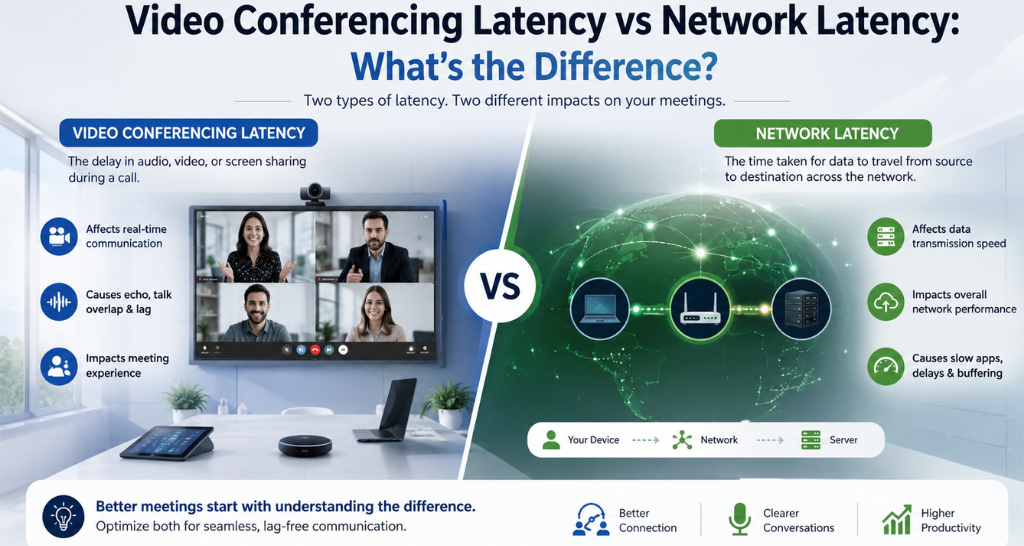
Video Conferencing Latency vs Network Latency: What’s the Difference?
Have you ever spoken during an online meeting and noticed that the other person responds a second later? Or perhaps the video freezes while the audio continues, or the speaker’s voice reaches you after their lips have already moved?
These issues are commonly described as Video Conferencing latency or network latency. However, the two terms do not mean exactly the same thing.
Network latency is only one part of the delay experienced during a meeting. A complete Video Conferencing system involves cameras, microphones, audio processors, codecs, displays, speakers, network infrastructure, and conferencing platforms. Each stage can introduce a small amount of processing or transmission delay.
Understanding the difference between network latency and overall Video Conferencing latency is important because the solution depends on where the delay originates. Increasing internet speed, for example, may not solve a delay caused by audio processing or display processing.
This guide explains what causes latency, how to identify the source, and what businesses can do to create smoother and more responsive meeting experiences.
What Is Video Conferencing Latency?
Video Conferencing latency is the total delay between an action happening at one location and that action being experienced by a participant at another location.
For example:
Person speaks → Microphone captures audio → Audio is processed → Data is transmitted → Remote system receives data → Audio is decoded → Speaker plays the voice
The same process happens with video:
Camera captures video → Video is processed → Video is encoded → Data travels through the network → Video is decoded → Display shows the image
The complete delay across this chain contributes to the user’s perception of Video Conferencing latency.
Even when the internet connection is fast, processing within cameras, microphones, DSPs, conferencing devices, displays, or software can contribute to the final delay.
What Is Network Latency?
Network latency refers specifically to the time required for data to travel from one point in a network to another.
It is commonly discussed in terms of milliseconds (ms) and can be evaluated using measurements such as ping or round-trip time (RTT).
For example, when a meeting participant speaks, the audio data has to travel from their device to the conferencing platform and then to the remote participant. The network introduces a certain amount of delay during this journey.
Network latency can be affected by:
- Physical distance
- Network congestion
- Internet routing
- Wi-Fi performance
- VPN connections
- Firewall processing
- Network equipment
- Packet loss
- Traffic volume
Therefore, network latency is an important component of Video Conferencing, but it is not the complete picture.
Video Conferencing Latency vs Network Latency
The easiest way to understand the difference is to think of network latency as one part of the journey, while Video Conferencing latency represents the overall communication experience.
| Factor | Video Conferencing Latency | Network Latency |
|---|---|---|
| Meaning | Overall communication delay | Network transmission delay |
| Scope | End-to-end meeting experience | Network path |
| Includes | Capture, processing, encoding, network, decoding and playback | Data transmission |
| Main Causes | AV hardware, processing, network and software | Distance, routing, congestion and network conditions |
| Common Measurement | End-to-end delay | Ping/RTT |
| Solution | Optimize the complete system | Optimize network infrastructure |
The key takeaway:
Network latency is not the same as total Video Conferencing latency.
A meeting can have low network latency and still feel delayed if the connected AV equipment introduces additional processing time.
Where Does Video Conferencing Latency Come From?
To understand the problem properly, it helps to follow the complete signal path.
1. Camera Capture and Processing
A camera first captures the participant’s image. Advanced cameras may perform auto-framing, speaker tracking, image enhancement, noise reduction, and other processing before sending the video onward.
These processes can introduce some delay.
2. Microphone and Audio Processing
Microphones capture speech and send it to an audio processor or DSP. Echo cancellation, noise suppression, automatic gain control, and other processing improve audio quality but can contribute to overall system latency.
3. Encoding
Video and audio must be compressed before being transmitted efficiently. Encoding requires processing time, which becomes another component of end-to-end delay.
4. Network Transmission
The encoded data travels through the local network, internet, or cloud infrastructure. This is where network latency becomes a major factor.
5. Cloud or Server Processing
Depending on the conferencing platform and system architecture, media may pass through servers where additional processing or routing can occur.
6. Decoding
The receiving system decodes the incoming audio and video before it can be played or displayed.
7. Display and Speaker Processing
The final output devices can also introduce processing delay. A display may perform image processing, while an audio system may apply additional DSP processing before reproducing the sound.
This entire chain determines the final Video Conferencing experience.
What Causes Network Latency?
Network conditions can significantly influence Video Conferencing performance.
Long Physical Distance
Data travelling between geographically distant locations generally takes longer than data travelling across nearby networks.
Network Congestion
When many users or devices are consuming network resources simultaneously, packets may experience delays.
Weak Wi-Fi
Wireless interference, poor signal strength, distance from the access point, or network overload can affect communication quality.
VPN Routing
VPNs can introduce additional routing and encryption overhead depending on the configuration.
Poor Network Infrastructure
Old switches, incorrectly configured routers, insufficient capacity, or poor network design can create unnecessary delays.
Packet Loss and Retransmission
When packets are lost, data may need to be retransmitted, affecting the smoothness of a meeting.
Latency vs Jitter vs Packet Loss :
These three terms are often confused, but they describe different problems.
| Issue | Simple Meaning | What You May Notice |
| Latency | Data arrives late | Delayed responses |
| Jitter | Delay keeps changing | Uneven or robotic communication |
| Packet Loss | Some data doesn’t arrive | Audio drops, frozen video |
| Bandwidth | Amount of data the network can carry | Quality limitations when overloaded |
A network can have good bandwidth but still experience latency or jitter. This is why simply upgrading an internet plan does not always solve every Video Conferencing problem.
How Does Latency Affect Meetings?
Latency becomes especially noticeable when participants need real-time interaction.
People Talk Over Each Other
If there is a noticeable delay, one participant may start speaking before hearing that someone else has already responded.
Audio and Video May Feel Out of Sync
A participant’s lips may move before their voice reaches the other side.
Meetings Become Less Natural
Small delays can make conversations feel less like face-to-face discussions.
Collaboration Becomes Difficult
Brainstorming, presentations, interviews, negotiations, and decision-making depend on quick responses.
For businesses, these small interruptions can accumulate into lost time and frustration and led video walls
How Can You Identify the Source of the Problem?
Before changing equipment or upgrading bandwidth, identify where the delay is occurring.
| What You Notice | Possible Cause |
| Entire meeting feels delayed | Network or end-to-end system latency |
| Audio is delayed but video is normal | Audio processing |
| Video freezes frequently | Network congestion or packet loss |
| Audio and video are out of sync | AV processing or synchronization issue |
| Problem occurs mainly on Wi-Fi | Wireless network |
| Problem occurs across multiple platforms | Infrastructure or room system issue |
| Only one room has the problem | Room-specific AV configuration |
A proper diagnosis should examine the complete signal chain rather than focusing only on internet speed.
Does Faster Internet Always Reduce Video Conferencing Latency?
No. This is one of the most common misconceptions about Video Conferencing. Bandwidth and latency are different network characteristics.
A connection may provide high bandwidth but still have latency caused by:
- Network routing
- Physical distance
- Congestion
- VPN processing
- Network equipment
- Server location
- AV processing
Think of bandwidth as how much traffic a road can carry, while latency is how long it takes a vehicle to reach its destination.
Making the road wider does not necessarily make the destination closer.
How to Reduce Video Conferencing Latency ?
Reducing delay requires a combination of network, AV, and room-level optimization.
1. Optimize the Network
Use a reliable wired connection wherever practical, configure network equipment correctly, and monitor congestion.
2. Reduce Unnecessary Processing
Review camera, DSP, codec, and display settings to avoid unnecessary processing stages.
3. Use Appropriate AV Equipment
Choose cameras, microphones, processors, displays, and speakers based on the room’s actual requirements.
4. Optimize Audio Processing
DSP settings should be configured carefully. Echo cancellation and noise reduction are essential, but excessive or poorly configured processing can affect performance.
5. Check Display Processing
Displays with extensive image processing may introduce additional delay. Appropriate low-latency settings can help in applications where real-time response is important.
6. Keep Systems Updated
Firmware and software updates can improve compatibility, reliability, and performance.
7. Test the Complete System
A professional commissioning process should test audio, video, network connectivity, synchronization, and control functions together.
Why AV Integration Matters for Latency?
Latency should not be treated as an isolated internet problem. Modern meeting spaces combine multiple technologies that need to communicate reliably.
A properly integrated system considers:
- Cameras
- Microphones
- Speakers
- DSP
- Displays
- Video processors
- Conferencing platforms
- Network infrastructure
- Control systems
This is where professional AV integration becomes important. Vallect’s TOP AV Integration in delhi services cover design, installation, integration, testing, and support for corporate meeting spaces and other professional environments.
The goal is not simply to install high-end equipment. The goal is to ensure that the complete system works together efficiently.
Can Room Design Affect Video Conferencing Performance?
Yes. The physical meeting room can influence the perceived quality of Video Conferencing even when the network itself is performing well.
For example:
Poor Acoustics
Sound reflections can make voices difficult to understand.
Incorrect Microphone Placement
Participants may sound distant or inconsistent.
Poor Camera Positioning
Participants may appear too small, partially hidden, or outside the camera’s field of view.
Screen Glare
Reflections can make shared content difficult to see.
Improper Speaker Placement
Uneven sound coverage can make remote participants difficult to hear.
This is why room design, equipment selection, and system integration should be considered together.
Video Conferencing in Different Meeting Spaces
Not every room needs the same technology configuration.
1. Huddle Rooms
Small spaces typically need compact cameras, microphones, speakers, and a display. Simple plug-and-play systems can be effective for quick meetings.
Vallect’s Huddle Room AV Solutions are designed around compact spaces, collaboration, video conferencing, wireless presentation, and simple room control.
2. Medium Conference Rooms
Medium rooms may require wider camera coverage, multiple microphones, larger displays, and more advanced room control.
3. Large Boardrooms
Large executive rooms often require PTZ cameras, beamforming microphones, multiple displays, DSP, centralized controls, and carefully planned network connectivity.
The larger and more complex the room, the more important end-to-end system design becomes.
What Role Does Maintenance Play?
Even a well-designed Video Conferencing system can develop problems over time.
Software updates, firmware changes, failing cables, microphone issues, display faults, network configuration changes, and equipment aging can all affect performance.
Regular AV Maintenance & Support can help identify these problems before they become major disruptions. Preventive maintenance can include system health checks, calibration, firmware updates, troubleshooting, and performance optimization.
For organizations that rely on meeting rooms every day, maintenance is not simply a repair service. It is part of maintaining consistent communication quality.
How Vallect Helps Reduce Video Conferencing Problems:
Vallect approaches Video Conferencing as a complete system rather than a collection of individual devices.
The process can include:
- Requirement analysis
- Room assessment
- Site survey
- Camera and microphone selection
- Network coordination
- DSP configuration
- Display selection
- Conferencing platform integration
- Installation
- System programming
- Testing and commissioning
- User training
- Ongoing support
For organizations looking to improve their meeting spaces, Vallect also provides Video Conferencing Solution for meeting room configurations based on room size, seating capacity, camera coverage, microphone requirements, and collaboration needs.
The objective is simple: meetings should start quickly, participants should be clearly heard and seen, and technology should stay in the background instead of becoming the focus of the meeting.
Key Takeaways :
The difference between network latency and Video Conferencing latency can be summarized in a few points:
- Network latency refers specifically to delay in data transmission.
- Video Conferencing latency represents the broader end-to-end communication delay.
- Camera, microphone, DSP, codec, network, server, display, and speaker processing can all contribute.
- High bandwidth does not automatically mean low latency.
- Jitter and packet loss can create problems even when latency appears acceptable.
- Proper AV integration can help identify and reduce unnecessary processing delays.
- Regular maintenance helps prevent performance issues from developing over time.