
 admin
May 26, 2026
admin
May 26, 2026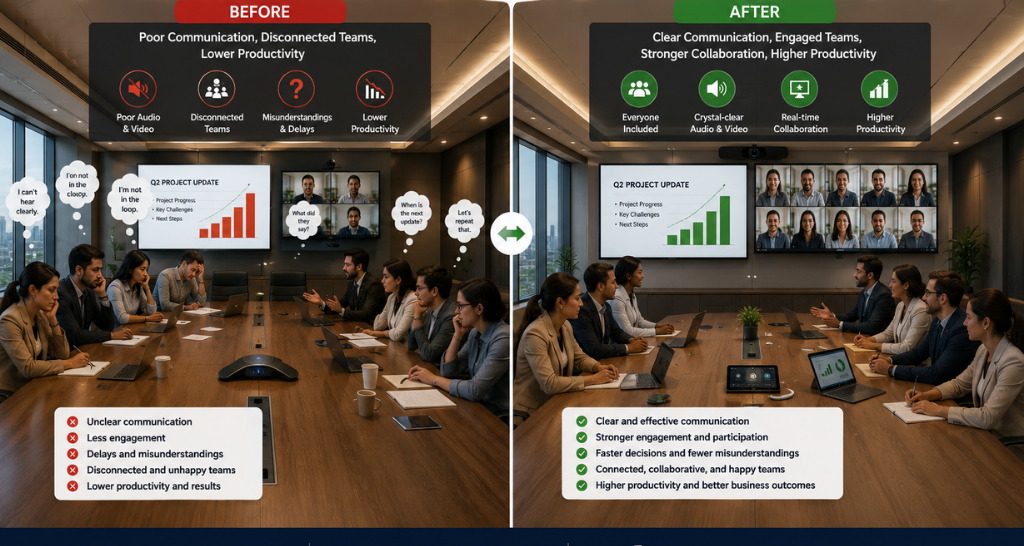
How Video Conferencing Systems Solve Poor Communication in Hybrid Workplaces?
The meeting had been scheduled for 10 AM. By 10:07, three people were still trying to join. One remote colleague was audible but invisible their camera refused to connect. Another was visible but silent, mouthing words into a microphone that had stopped working at some point between yesterday and today. The people in the conference room were having a separate, quieter conversation amongst themselves because waiting felt more productive than troubleshooting. By the time everyone was finally on the same call, twelve minutes had passed, the agenda had been compressed, and two people had already mentally checked out. The decisions made in that meeting were rushed. A follow-up had to be scheduled for the following week. And nobody said it out loud, but everyone in that room and on that call knew the real problem had nothing to do with the project itself.
Video Conferencing enables seamless communication, real-time collaboration, and high-quality meetings for hybrid workplaces, improving productivity and team connectivity.
This is hybrid work without the right infrastructure. And it is happening in offices across the country every single day.
What Is Actually Breaking Down in Hybrid Communication?
Hybrid work sounds straightforward some people in the office, some working remotely, everyone connected through technology. In practice, it creates a communication gap that most organisations underestimate until it starts affecting their output.
The people in the room have eye contact, body language, and shared physical context. The people on the call have a small window on someone’s screen, audio that cuts in and out, and no reliable way to signal that they want to speak. Decisions get made in the room. Remote colleagues find out later. Work gets duplicated. Alignment slips. And gradually, the teams that were supposed to be working together start operating as two separate groups one visible, one peripheral.
This is not a people problem. It is an infrastructure problem. And Video Conferencing Systems are the infrastructure that hybrid workplaces are missing.
Why Do Basic Video Calls Keep Failing Hybrid Teams?
Most organisations set up hybrid work by simply installing a software platform a video call tool on a laptop, a cable for the TV in the meeting room, and a hope that it all works together. For small, infrequent meetings, this might be enough. For a business that runs on collaboration, it falls apart quickly.
Consumer-grade webcams cannot capture a full conference room. Built-in laptop microphones pick up every sound except the voice that matters. The audio from the room bleeds into itself, creating echo that makes listening exhausting. Screen sharing freezes at exactly the wrong moment. And when multiple people in the room speak at once, the remote participant hears a wall of noise that communicates nothing.
Video Conferencing for Remote Teams fails not because the concept is wrong but because the hardware and integration behind it have not been set up for the reality of how hybrid teams actually work. A software subscription without proper room equipment is like having a fast car with no road to drive it on.
The gap is not in the intention. It is in the implementation.
What Does a Hybrid Workplace Actually Need From Its Communication Setup?
The answer becomes clear when you think from the perspective of the person on the call the remote colleague who is supposed to be an equal participant in every meeting.
They need to see everyone in the room not just the person sitting closest to the laptop. They need to be heard clearly without people in the room having to lean towards a microphone. They need to see shared content without it being a blurry thumbnail on someone’s screen. They need to be able to speak without waiting for a gap in the room conversation and hoping someone notices. And they need all of this to work instantly, every time, without a ten-minute setup ritual at the start of every meeting.
Virtual Meeting Technology for Hybrid Teams that is purpose-built for this reality does not just improve the call quality. It changes the entire dynamic of how remote and in-office colleagues work together.
How Proper Video Conferencing Systems Change Everything
Purpose-built Video Conferencing Systems are not simply better cameras and microphones. They are integrated solutions designed specifically for the dynamics of hybrid collaboration.
Wide-angle room cameras capture the entire conference room every participant, every expression, every gesture so that the remote colleague is not staring at a single fixed angle of one person’s face. Beamforming microphone arrays pick up voices from across the room with noise cancellation that filters out everything else. High-quality speakers deliver remote audio at a volume and clarity that makes the person on the call feel present rather than distant.
Video Conferencing Integration for Workplaces at this level means all of this works together seamlessly the moment someone walks into the room, the system is ready. No cables to connect. No settings to adjust. No waiting.
For Video Conferencing for Corporate Offices, this reliability is not a luxury it is a baseline requirement for any organisation where time, decisions, and team alignment have real business value.
The Role of AI-Powered Video Conferencing Technology in Modern Hybrid Work
The latest generation of Video Conferencing Systems goes further than hardware quality. AI-Powered Video Conferencing Technology brings intelligence into the meeting room in ways that directly solve the most persistent hybrid communication problems.
Auto-framing cameras use AI to detect who is speaking and adjust the frame accordingly so the remote participant always sees a well-composed view of the active speaker, not a wide shot of an empty corner of the room. Background noise suppression uses machine learning to separate voice from ambient sound in real time, so a colleague taking a call from a busy location comes through as clearly as someone in a silent office.
Automated transcription and meeting summaries mean that the decisions made in a hybrid meeting are documented instantly removing the gap between what was discussed and what gets acted upon. Virtual Meeting Technology for Hybrid Teams with these capabilities does not just make meetings better. It makes the outcomes of those meetings more reliable.
For organisations where hybrid work is the long-term operating model, AI-Powered Video Conferencing Technology is the difference between a system that keeps up with how people work and one that constantly falls behind it.
Back to That 10 AM Meeting What Should Have Happened
With a properly integrated Video Conferencing System, the 10 AM meeting looks completely different.
The remote colleagues join with one click no drivers, no cables, no setup. The room camera automatically frames the team at the table. The microphone array picks up everyone speaking clearly, regardless of where they are sitting. The remote participants can see the shared presentation on their screen in full resolution. When someone on the call wants to speak, they can and they are heard.
The meeting starts on time. The agenda is completed. The decisions are made with full participation from everyone in the room and on the call. A summary is automatically generated and shared before people have even left their desks.
No follow-up meeting needed. No decisions revisited. No colleagues feeling like they were an afterthought.
What to Look For When Choosing Video Conferencing Systems for Your Workplace
Not every Video Conferencing System is built for the same environment. The right solution depends on how your teams work, the size of your meeting spaces, and the platforms your organisation already uses.
Room size determines camera field of view and microphone range. A huddle room with four people needs a different configuration than a boardroom with twenty. Platform compatibility matters your hardware needs to work natively with the software your teams are already on, whether that is Microsoft Teams, Zoom, Google Meet, or a combination. Ease of use is critical if the system requires any kind of technical knowledge to start a meeting, adoption will be inconsistent and the problems will continue.
Video Conferencing for Corporate Offices also needs to account for scalability the ability to standardise the same experience across multiple rooms and multiple office locations so that every meeting, regardless of where it happens, works the same way.
A proper Video Conferencing Integration for Workplaces is not a single product purchase it is a system design that starts with understanding how your people work and builds the right infrastructure around that reality.
Hybrid Work Works When the Communication Infrastructure Works
The organisations that have made hybrid work genuinely effective are not the ones with the most flexible policies or the best project management tools. They are the ones that invested in making communication between remote and in-office colleagues feel equal, reliable, and effortless and Indoor LED video walls enhance workspaces with clear visuals, seamless presentations, real-time collaboration, and engaging communication for a more productive environment..
Video Conferencing Systems are that investment. Not as a convenience, but as the foundation that everything else in a hybrid workplace is built on. When communication works, collaboration follows. When collaboration works, so does everything else.
The 10 AM meeting that wasted twelve minutes and produced rushed decisions that is a solvable problem. It has been solved. The only question is when your organisation decides to solve it.