
 admin
September 2, 2026
admin
September 2, 2026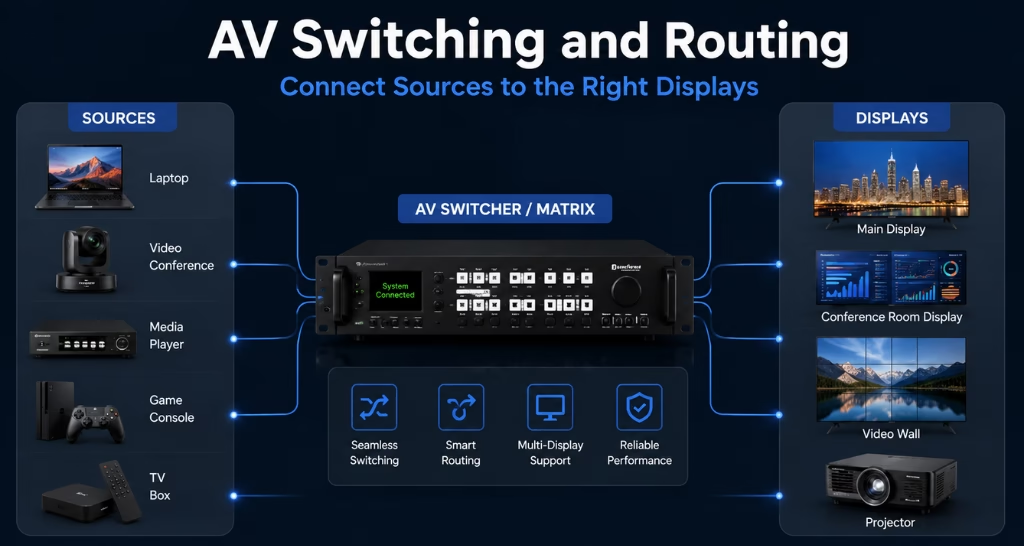
How AV Switching and Routing Connect Sources to the Right Displays?
Imagine an auditorium where a presentation is running on the main LED Video wall. a live camera feed needs to appear on the side displays, while the green room requires a confidence monitor showing the stage activity. at the same time, the technical team needs to preview the next source without interrupting the content visible to the audience. connecting every source directly to every display would require frequent cable changes, separate controls and constant technical intervention.
This is where AV Switching and Routing becomes important. It creates an organised path between every input source and display. the system allows users to select what content should appear, where it should appear and when it should change.
What Is AV Switching and Routing?
An AV system may receive content from laptops, cameras, media players, video conferencing systems, document cameras and other devices. these devices act as sources. the content may need to appear on an LED video wall, projector, commercial display, confidence monitor, preview screen or recording system.
These devices act as destinations. AV switching selects the required source from the available inputs. AV routing directs the selected source towards the required output or destination also AV Switching and Routing.
For example, a boardroom may have three laptops, a video conferencing system and a wireless presentation device. Instead of connecting each device manually to the main screen, every source becomes part of a centrally managed Audio Visual System.
The user can then select the required source from a touch panel. the switching and routing system processes the instruction and sends the chosen content to the correct display.this process may look simple to the user, but several technical operations happen behind the scenes.
What Role Does AV Switching and Routing Play in an AV System?
The primary role of AV Switching and Routing is to manage the movement of audio and video signals. It creates a controlled connection between multiple sources and multiple destinations.
Without this system, users may need to disconnect and reconnect cables every time the content changes. this becomes difficult when a space has several input sources, displays and audio zones. AV routing removes this dependency on physical cable changes. It allows the same infrastructure to handle different presentation and communication requirements.
The system can perform several functions:
- Select one source from multiple connected devices.
- Send one source to a particular display.
- Show the same source on multiple displays.
- Display different sources on different screens.
- Switch between sources without disturbing the meeting or event.
- Route audio separately when the application requires it.
- Provide preview feeds to the technical team.
- Send content to recording and streaming systems.
The importance of these functions increases with the size of the AV environment. a small meeting room may require only basic source selection. a large auditorium, command centre or divisible conference facility may need hundreds of possible signal paths. AV Switching and Routing keeps these paths organised and makes the system easier to operate.
How Does AV Switching and Routing Work?
The process begins when content enters the AV system through an input device. this device could be a presenter’s laptop, a video conferencing system, a camera or a media player and AV Switching and Routing.
the source transmits an audio and video signal through HDMI, USB-C, DisplayPort, SDI or a network connection. the signal then reaches the switching and routing equipment.this equipment identifies the input and prepares it for distribution. when a user selects a destination, the system creates a route between the chosen source and output.
The complete path generally works like this:
Source device → Input connection → AV switcher or routing platform → Signal processing → Output connection → Display
Each part of this path has a specific purpose for AV Switching and Routing.
Source input
The input receives content from the connected device. the system may also detect the source resolution, frame rate, audio format and content protection requirements.
Signal processing
Different sources may send content in different resolutions and formats. signal processing helps make that content compatible with the destination display. for example, a laptop may output content at a resolution that does not match the native resolution of an LED video wall. a video processor or scaler can adjust the signal before it reaches the display.
Routing decision
The routing platform receives a command that defines where the source should go.that i nstruction may come from a touch panel, keypad, control room interface or automated preset.
Signal transmission
The system sends the selected content through physical AV cables, fibre or an IP network.the transmission method depends on the signal distance, required quality and system scale.
Display output
The receiving device decodes or processes the signal and presents it on the selected display. a properly designed system completes this process quickly enough that the user experiences a smooth source change. and An indoor LED video wall delivers bright, seamless visuals for boardrooms, control rooms, retail stores, museums, auditoriums, and corporate spaces.
How Does the System Know Which Source Goes to Which Display?
Inputs may be named according to their use, such as:
- Boardroom laptop
- Wireless presentation
- Video conferencing system
- Stage camera
- Media player
- Document camera
Outputs may be named according to their location, such as:
- Main LED wall
- Left-side display
- Right-side display
- Green room monitor
- Control room preview display
- Recording system
The control interface presents these names to the user. if the user selects “Wireless Presentation” for the “Main LED Wall,” the control system sends the corresponding command to the routing equipment. the system then establishes the required connection. this naming and programming approach hides the technical complexity from the user. they do not need to remember input numbers, output numbers or cable paths and AV Switching and Routing.
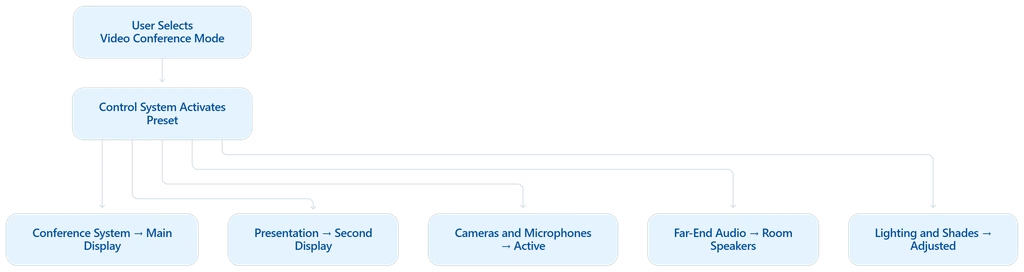
They only need to select the content and its destination. room presets can simplify the operation even further. For example, a “Video Conference Mode” may automatically perform several actions:
- Route the conferencing system to the main display.
- Send the presentation to the second display.
- Activate the required cameras and microphones.
- Route far-end audio through the room speakers.
- Change the lighting and window shades.
- Prepare the system for content sharing.
A single selection can therefore create multiple AV routes at the same time.
What Problems Does AV Switching and Routing Solve?
| Problem → | AV Switching and Routing → | Result |
|---|---|---|
| 🔌 Repeated cable swapping | Centralised source switching | Change content without moving cables |
| ▣ Limited display inputs | More connected sources | Use every required source |
| 🔀 Wrong feed on a screen | Programmed source mapping | Send the right feed to each display |
| 🖥 Blank screens | Signal detection and monitoring | Find faults faster |
| ⏱ Slow content changes | Fast switching and preview | Smooth, verified transitions |
| 🔗 Signal loss over distance | Fibre, extenders or AV-over-IP | Stable long-distance delivery |
| ⛶ Different resolutions | Signal scaling and processing | Correct image on every screen |
| 🎛 Complicated room operation | Simple control interface | One-touch room control |
The value of AV Switching and Routing becomes clearer when we examine the problems it addresses.
Repeated cable swapping
In a system without proper switching, users may need to remove one cable and connect another whenever they want to change the source. this interrupts meetings and increases wear on ports and cables. a centralised switching system keeps sources permanently connected and allows users to change content through a control interface.
Limited inputs on displays
A display may provide only two or three physical inputs. however, a meeting room or auditorium may use several source devices. AV switching expands the number of sources that can be used without depending on the display’s built-in inputs and AV Switching and Routing.
Complex AV spaces often have multiple displays serving different purposes.
Manual connections can send the wrong feed to the wrong screen, especially when a Video Conferencing System shares content across multiple displays. programmed routing creates clear source-to-display mapping and reduces such errors.
Blank screens during a presentation
A blank display may occur because of an incorrect input selection, resolution mismatch, damaged cable or content protection issue. a well-designed routing system manages input detection and signal compatibility more effectively. monitoring tools can also help technicians identify where the signal path has failed.
Delays when changing content
Meetings and live events cannot pause every time a source needs to change. a properly configured AV switching system enables quick transitions between laptops, cameras, media players and other inputs. preview and confidence monitoring can help the operator verify the next source before making it visible and AV Switching and Routing.
Signal loss over long distances
Standard AV cables may not carry high-resolution signals reliably across large rooms or buildings. routing systems can use signal extenders, fibre transmission or AV-over-IP endpoints to cover longer distances. this allows content sources and displays to be located far apart without sacrificing signal stability and AV Switching and Routing.
Different resolutions across devices
A laptop, camera and media player may each provide a different output resolution. the connected displays may also have different formats and aspect ratios. signal scaling and processing help ensure that each source appears correctly on the selected screen.
Complicated room operation
A technically capable AV room can still fail if users find it difficult to operate. integrating routing with a clear control interface lets users select sources and displays without understanding the underlying infrastructure.
How Multiple Sources and Displays Are Managed Simultaneously?
Modern AV environments rarely use only one source and one display. different content may need to move through the system at the same time. consider a command and control room. operational data may appear on the main video wall. CCTV feeds may be shown on secondary displays. a video conference may run on a separate screen. supervisors may also need to view a dashboard on their workstations. AV Switching and Routing manages these independent signal paths from one system. it supports three common routing situations.
One source on one display : A laptop presentation is sent to the main boardroom display. This is the simplest routing requirement.
One source on multiple displays : A live camera feed is sent to the main LED wall, side displays and green room monitor. this is common in auditoriums, conference venues and live events.
Different sources on different displays : A presentation appears on one screen, remote participants appear on another and a camera preview remains visible on the operator’s monitor. this is useful in boardrooms, control rooms and training facilities. the system may also allow the operator to change one route without affecting the others. for example, the source shown on a preview monitor can be changed while the audience continues to see the main presentation. this independent control is one of the most important benefits of proper AV routing.
How AV Switching and Routing Works Across Different Spaces?
The fundamental process remains the same, but the routing requirements change according to the space and AV Switching and Routing.
Boardrooms and meeting rooms
A boardroom may include table inputs, wireless presentation, video conferencing and digital signage. AV routing allows users to present from different devices and control which content appears on each display. in a dual-display setup, one screen can show remote participants while the other shows shared content.
Auditoriums
An auditorium may use laptops, stage cameras, media servers and presentation systems as sources. content may need to reach the main screen, side displays, stage monitors, control room screens and green room displays. AV routing helps the technical team control these feeds without changing physical connections during the event also AV Switching and Routing.
Command and control rooms
Control rooms receive data from monitoring platforms, surveillance cameras, operator workstations and communication systems. the team must be able to place any required feed on the appropriate section of the video wall. AV Switching and Routing provides the flexibility required to manage these changing operational priorities.
Educational spaces
A lecture hall may use instructor laptops, document cameras, interactive displays and lecture-capture systems. routing allows content to be displayed in the room while simultaneously being recorded or streamed to remote students and AV Switching and Routing and AV Switching and Routing.
Hotels and convention centres
Ballrooms and meeting facilities may be divided into smaller spaces or combined for large events. the AV routing system must adjust according to the selected room configuration. room presets can change the signal paths when movable partitions are opened or closed.
Corporate campuses
Content may need to be shared between boardrooms, training rooms, collaboration spaces and common areas. network-based routing can make authorised sources available across several rooms without building a separate system for each space.
How to Plan a Reliable AV Switching and Routing System
Reliable routing begins with understanding how the space will actually be used. the design should not be based only on the current number of devices. it must also consider signal quality, operating workflow and future expansion.
List every source and destination
The first step is to identify all existing and planned sources. the same process should be followed for displays, audio systems, recorders and streaming platforms. spare inputs and outputs should be included for future devices.
Map the required signal paths
Not every source needs to connect to every destination. the design team should identify which routes are required during normal operation and special events. this prevents unnecessary complexity while preserving important flexibility.
Check resolution and bandwidth
Higher resolutions and frame rates require greater bandwidth. the switching equipment, cables, extenders and network infrastructure must support the required signal format. a single weak component can restrict the performance of the entire signal path.
Measure transmission distances
The distance between a source and display determines the appropriate transmission method. short connections may use standard AV cables. longer routes may require fibre, twisted-pair extension or AV-over-IP distribution.
Plan the control experience
Users should be able to operate the system according to tasks rather than technical port numbers. clear labels, simple commands and useful presets reduce operating errors.
Consider switching behaviour
Some applications can tolerate a brief interruption when the source changes. live events and control rooms may require seamless or near-seamless switching. this requirement must be established before selecting the switching and processing equipment.
Provide monitoring and maintenance access
Technicians need visibility into the signal path when a problem occurs. central monitoring can help identify whether the issue is at the source, switcher, network, receiver or display. configuration backups and accurate system documentation also make troubleshooting faster.
Allow for expansion
A system designed only for today’s inputs may become restrictive when new displays or sources are added. capacity planning helps the organisation expand the AV setup without replacing the complete routing infrastructure.
How Vallect Designs AV Switching and Routing Solutions?
Vallect approaches AV Switching and Routing as part of the complete AV workflow. the process begins by studying the number of sources, display locations, room layouts and ways in which users need to share content. the team maps each required signal path and evaluates resolution, transmission distance, switching speed, control requirements and future expansion. the routing system is then integrated with displays, audio systems, video conferencing platforms, cameras, control interfaces and room automation.
Clear source names and task-based presets make the system easier for users to operate. testing is carried out across different operating scenarios to verify that each source reaches the intended display without affecting other active routes. this integrated approach helps create an AV environment where complex signal distribution happens behind the scenes while the user receives simple and predictable control.